
Compt’s stipend and Lifestyle Spending Account (LSA) expense review process checks each reimbursement request against the employee’s supporting documentation and the employer’s policy before the expense moves to payroll. The goal here is to reduce the repetitive work of reviewing claims without giving HR and Finance any less control over the decisions that matter to your business and your people.
The Compt platform uses a combination of fixed rules and optional AI-assisted features to achieve that goal. Compt helps employees quickly submit complete claims, then checks the receipt and policy, surfaces the relevant context, and can automatically approve qualifying claims when the employer has enabled that option. HR and Finance step in when a claim actually needs human review.
This guide walks you through Compt’s full LSA expense review process: what employees submit, how claims are checked, where AI fits in, what happens when a person needs to review an expense, and what your CFO and Finance team can see afterward.
What does Compt check during LSA expense review?
Every LSA or stipend expense review on the Compt platform starts with just two things: the employee’s claim and your established stipend policy.
Compt checks whether the employee’s submitted proof of purchase matches their claim and whether the expense fits the rules of your LSA or stipend program. That often includes details like the vendor, amount, date, eligible category, and any limits or requirements you’ve set in your stipend policy.
Some checks follow fixed rules, including tax classification, eligibility logic, and payroll reporting. AI is used where interpretation helps: reading and autofilling receipts, applying the written policy, identifying discrepancies, and recommending an outcome. When the result is uncertain or a claim needs judgment, it always goes to a person.
The first step is making sure your employee has submitted the correct information to evaluate the expense against your policy in the first place.
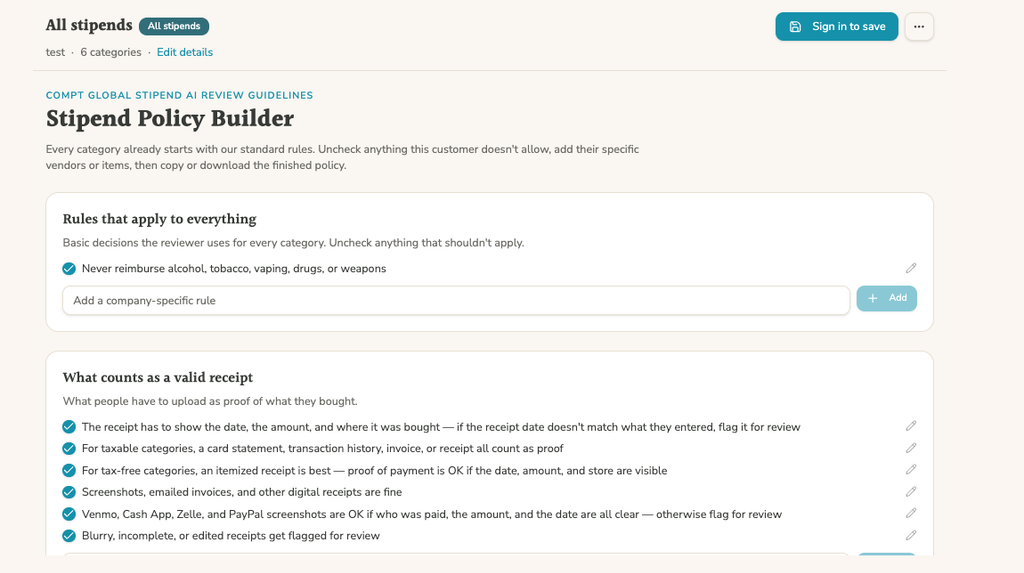
Your employee stipend policy, simplified.
Build a clear, customizable stipend policy for what’s covered, who’s eligible, and how expenses are handled. The Stipend Policy Builder starts with Compt’s LSA policy guidelines and lets you tailor the rules to your program.
What counts as proof of purchase for LSA claims?

Employees upload a receipt or other supporting documentation with an LSA expense. Compt supports receipt photos, screenshots, PDFs, and multiple supporting documents, so your people aren’t limited to one specific receipt format. You can decide what documentation your stipend policy accepts, such as things like digital receipts, transaction histories, screenshots, invoices, and payment-app confirmations.
Claim Autofill does the hard work by filling in the claim. When your employee uploads their proof of purchase, Compt reads the vendor, amount, and date, then picks the right category from what your company decided is eligible. The employee only has to check it and submit it.
How does auto-approval work for LSA expenses?
Compt can reduce the number of routine LSA claims your team has to review in two ways: fixed auto-approval rules and optional AI-assisted auto-approval through Claim Reviewer. In both cases, your company decides what clears automatically and what still needs a person.
The first path uses fixed rules set for the program. Compt supports auto-approval rules for both low-dollar claims and known-vendor receipts, and a submission only needs to clear one of those conditions to go through automatically. That’s an OR, not an AND; a claim only has to hit a single rule to trigger automatic approval.
Let’s say Peloton is really popular among your workforce. If Peloton is always eligible under your wellness policy, you save time on the admin side by setting up a vendor rule: any submission from that vendor clears instantly.
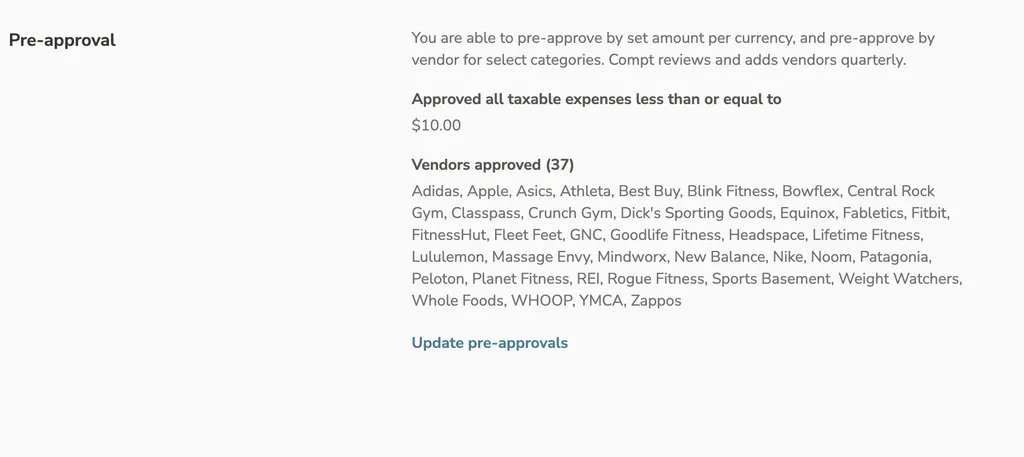
Separately, you might have a threshold rule that auto-approves any claim under $10, regardless of the vendor, so long as it falls within an approved category. So, an employee submitting a $8 receipt for home-workout equipment they bought on Amazon never touches Peloton, and it doesn’t need to because the “threshold” rule alone gets it through.
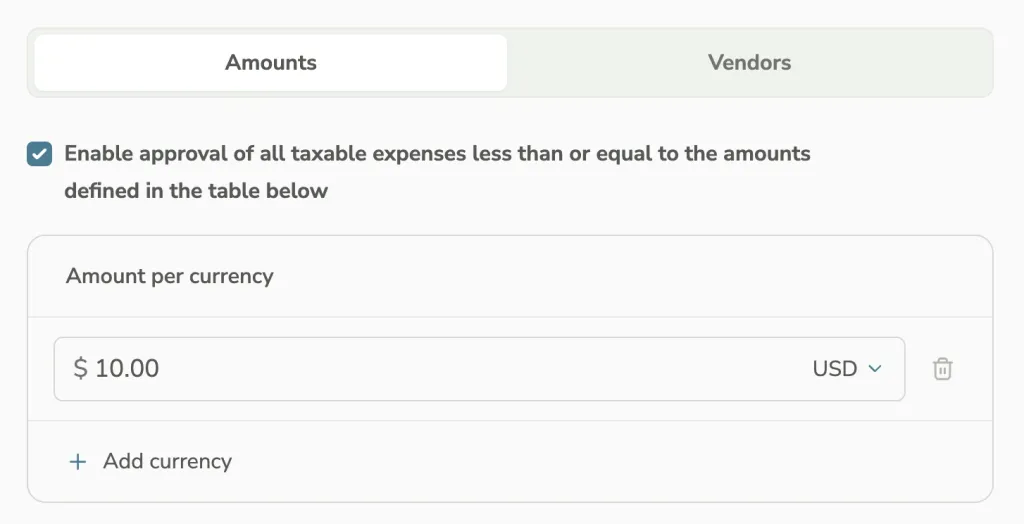
To set this up, an admin picks a category, then chooses a rule type: vendor-based or dollar-threshold-based. Both can run side by side within the same category. These are fixed rules: the same relevant information under the same rule produces the same result, so an automatic approval can be traced back to the condition that triggered it.
The second path to automatic approval uses Compt’s AI-assisted Claim Reviewer. After an employee submits a claim, Claim Reviewer checks whether the receipt supports the claim, evaluates it against your written policy, and returns an approve, reject, or uncertain recommendation along with its reasoning and any discrepancies it found.

From there, a claim can be approved automatically only when all three conditions are true: your company has explicitly enabled AI-assisted auto-approval, Claim Reviewer recommends approval, and its confidence is high. Anything that falls short goes to the review queue. Compt AI never automatically rejects an employee’s claim.
What happens when an LSA expense needs human review in Compt?
Claims that reach your review queue already include the supporting documentation, policy context, and Claim Reviewer’s recommendation and reasoning, including any receipt discrepancies or policy issues it identified.
When Compt can’t make a clear determination, it routes the claim to a person instead of letting the system act on an unclear result. That includes uncertain results, rejection recommendations, receipt mismatches, and review errors.
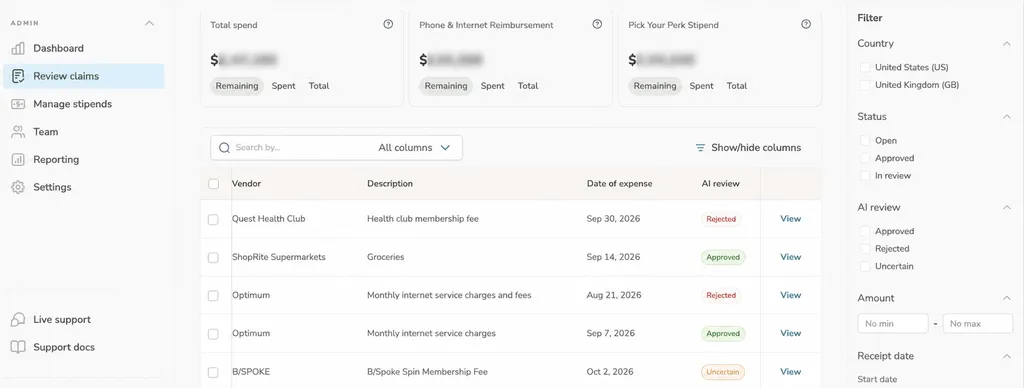
Common reasons a claim may need human review include:
- Incomplete or inconsistent documentation
- A purchase that isn’t approved for that LSA or stipend category
- A vendor you’ve flagged as ineligible
- A purchase dated outside the applicable policy period
- A duplicate or future-dated submission
From there, you or another reviewer can approve or reject expenses individually, or bulk-approve multiple claims when appropriate. Individual review may be better for one-off expenses like a student loan repayment, while bulk approval can save you time on higher-volume, predictable categories like cell phone reimbursements.
If the issue leading to a rejection is small, like an incorrect amount or vendor, you can edit the claim instead of sending it back to the employee. When you do reject a claim, the employee gets an email explaining why, and can correct the issue and resubmit when appropriate.
How you handle the funds on rejected claims is configurable, too. You can return them in the next benefits cycle, return them immediately, or not return them at all. That last option often makes the most sense for benefits tied to a specific time period, such as a monthly commuter benefit.
Who handles the final review: your admin or Compt?
The difference between an in-house final admin review and a Compt-managed review is who owns the claims that still need a person after Compt has applied the rules and any AI-assisted review features your company has enabled.
With in-house final admin review, claims that still need a person go to your HR or benefits admin in the Compt dashboard. Fixed rules, your auto-approval settings, and any optional AI-assisted features you’ve enabled (e.g., Policy Checker, Claim Reviewer) can handle or streamline much of the work before anything reaches that queue.
With Compt-managed review for qualified programs, our Customer Success team owns the review queue instead, so your HR team doesn’t have to review receipts at all. This option usually only applies to larger accounts; ask your Compt Benefits Consultant or Customer Success Manager for more details.
| Final admin review vs. Compt-managed review for LSAs | ||
|---|---|---|
| Final admin review | Compt-managed review | |
| Who handles the final review? | Your HR or benefits admin | Compt’s team |
| Available to | All accounts | Usually larger accounts; ask your Compt team for details |
| How routine claims are handled | Compt applies configured rules and any enabled AI-assisted review features; qualifying claims can clear automatically when enabled | Same platform review process; Compt’s team owns the remaining review queue |
| When judgment is needed | Your admin handles the claim | Compt’s team handles the claim on your behalf |
| Nontaxable categories | Tax treatment follows configured program rules; your admin handles the remaining review | Compt’s team reviews nontaxable submissions |
| Typical admin time | 10 to 90 minutes per pay cycle (customer-reported) | Effectively zero because HR does not review receipts |
Across both in-house final admin review and Compt-managed review, fewer than 1% of submissions were rejected in 2025. By the time a claim reaches a final decision, the overwhelming majority are eligible for reimbursement, which keeps the review process focused on exceptions rather than a constant stream of rejected expenses.
How does Compt handle LSA claims at year-end?
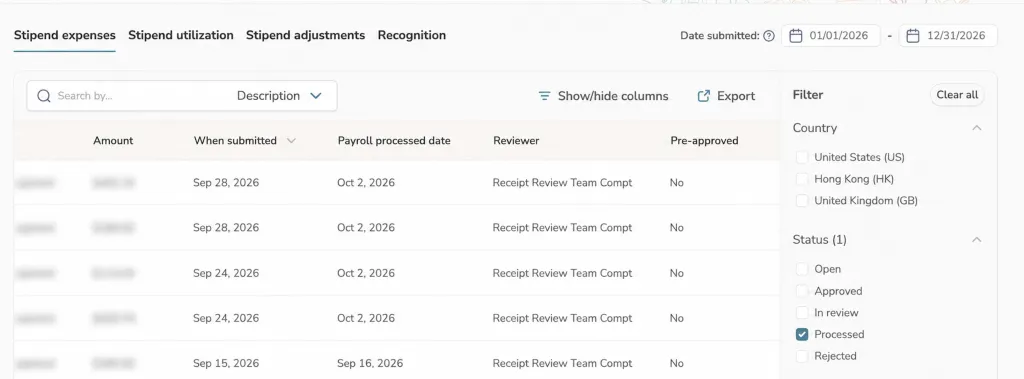
For purposes of your benefits program, Compt uses the claim submission date to determine which program period the expense applies to. That is especially important when a claim crosses from one calendar year into the next, but it’s separate from how the reimbursement is treated for federal tax purposes.
Submission date gives Compt a fixed timestamp for the claim, while payout timing depends on the employer’s payroll schedule. Using payout date instead could move the same submitted claim into a different month or year simply because of when payroll runs.
Say an employee submits a claim on December 29 while everyone’s OOO for the holiday. Payroll doesn’t run until the first week of January. That claim still counts toward the prior program year in Compt even though the money hits their paycheck in the new one, because the expense was submitted in December.
It’s the same in reverse. If an employee has a December receipt but waits until January to submit it, Compt treats the claim as part of the new program year. The purchase date and payout date don’t override the submission date for purposes of the employee’s program allocation.
That distinction is most important to understand for benefits with annual tax limits, like the $5,250 exclusion for qualifying educational assistance in 2026. Under Section 127, up to $5,250 in qualifying educational assistance can be excluded from an employee’s gross income during the calendar year, and unused amounts don’t carry forward. So a December expense can draw against the prior program year in Compt while the reimbursement itself falls under the new calendar year’s Section 127 limit if it is reimbursed in the new year.
Psst: Read more about IRS compliance for lifestyle benefits.
What audit trail and reporting does Finance get for LSA expenses?
Compt gives Finance a documented trail from the original employee submission through approval and payroll reporting, plus exportable reports for audits, reconciliation, and bookkeeping.
Compt reporting lists each approved expense on its own line with details including the vendor, category, submission date, tax classification, and whether the claim was auto-approved or reviewed by a person.
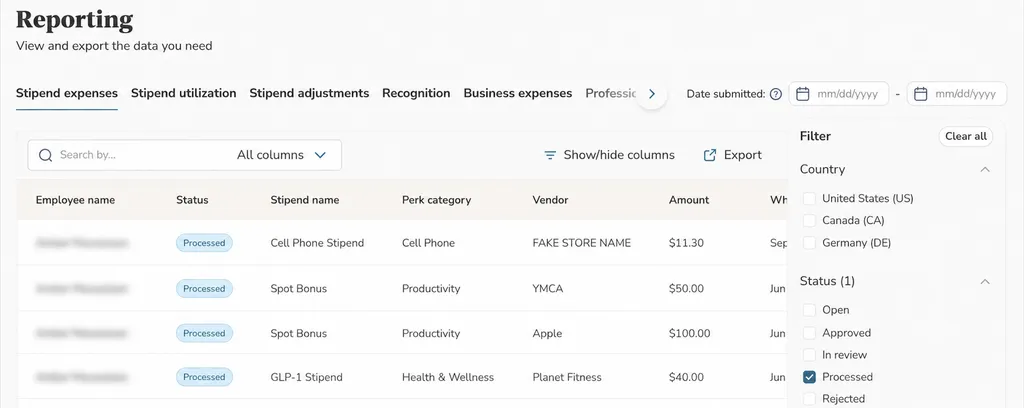
Compt also provides a separate Finance report for nontaxable expenses, formatted for GL and bookkeeping so Finance can work with those figures without first sorting them out from taxable transactions.
Every expense ties back to its original receipt and approval history, so Finance doesn’t have to reconstruct what happened later. For AI-assisted claims, the claim history also records what Claim Reviewer found, what it recommended, why, and what happened as a result. If Finance or an auditor asks about a specific reimbursement, there’s already a record of the path it took.
See what Compt could take off your team’s plate.
Every benefits program has its own policies, workforce, and preferences for how much review HR and Finance want to own in their stipend or LSA program. Compt can automate or streamline much of the process based on the rules and features you enable.
Want to see what that would look like for your specific org structure and stipend or LSA program design? Request a Compt demo today.
Quickbase, a company of ~800 employees, switched to Compt and got their benefits processing time down to 90 minutes per month.
FAQs: LSA expense review
Compt supports auto-approval rules for both low-dollar claims and known-vendor receipts. An admin can set a dollar threshold or identify vendors whose purchases can clear automatically within an eligible category, and a claim only needs to meet one applicable rule to trigger that approval.
Compt also offers a separate AI-assisted auto-approval path through Claim Reviewer. When a customer explicitly enables it, qualifying high-confidence approval recommendations can clear automatically.
Which stipend platforms automatically flag or reject ineligible submissions before they reach an admin?
Compt flags likely policy problems before a claim reaches an admin, but it does not automatically reject employee submissions.
Before submission, Compt’s AI-powered Policy Checker compares the claim with the employer’s written policy and flags missing information or expenses that appear to fall outside the rules. The employee can correct the issue or choose to submit anyway. After submission, Claim Reviewer can recommend rejection, but an admin makes the final call.
Which Lifestyle Spending Account platforms provide documentation exports for compliance audits?
Compt provides exportable reports and a documented claim history that Finance and Legal teams can use during audits. The Expense Details report shows approved expenses individually, including information such as vendor, category, submission date, tax classification, and review path. Compt also provides a separate Finance report for nontaxable expenses.
Each expense ties back to its receipt and approval history. For AI-assisted review, the claim history also records what Claim Reviewer found, what it recommended, why, and what happened as a result.
What’s the best Lifestyle Spending Account software for using utilization data to redesign benefit categories at renewal?
Compt tracks utilization as employees use their LSA or stipend funds, so HR can compare how much of the available budget employees are actually spending across programs and categories. That gives teams evidence to use when deciding whether to change categories, budgets, or program structure at renewal.
Funding design can matter as much as the amount offered. Compt’s 2026 benchmark data, for example, found that quarterly-funded programs averaged about 85% utilization compared with 52% for monthly programs. A low-utilization program may need a different funding cadence or structure rather than simply a larger budget.
What’s the best Lifestyle Spending Account software for handling tax year crossover — like when an employee submits a December receipt in January?
Compt uses the claim submission date to determine which program period an LSA or stipend expense applies to. If an employee has a December receipt but waits until January to submit the claim, Compt treats it as part of the new program year. If they submit in December but aren’t reimbursed until January payroll, it remains part of the prior program year in Compt.
That program-year treatment is separate from federal tax treatment. The calendar year in which a reimbursement is taxable or excludable depends on the rules for the specific benefit, so employers should work with their own tax or legal advisors on year-end tax treatment.
Which Lifestyle Spending Account platforms use AI to autofill or verify expense receipts?
Compt uses two different AI-assisted features for those jobs. Claim Autofill reads an uploaded receipt and drafts information such as the vendor, amount, date, and eligible category; the employee is able to review the information before submitting.
After submission, Claim Reviewer checks whether the receipt supports the claim, including the vendor and amount, and evaluates the claim against the employer’s written policy. Receipt autofill and receipt verification are therefore different steps in the Compt workflow, not one generic AI feature.
How does AI-assisted claim review work in benefits administration software?
Compt’s AI-assisted Claim Reviewer does the first pass on a submitted claim. It checks whether the supporting receipt matches the claim and appears valid, evaluates the expense against the employer’s written policy, and produces an approve, reject, or uncertain recommendation with the reasoning and any discrepancies it found.
Customers can choose to automatically approve qualifying high-confidence recommendations. Claims that don’t meet those conditions remain in the human review queue.
Which benefits platforms combine AI recommendations with human approval for claims?
Compt combines AI recommendations, customer-controlled automation, and human review in the same claim workflow. Claim Reviewer does the initial analysis and explains its recommendation; the customer controls whether qualifying high-confidence approvals can proceed automatically. Claims that don’t meet those conditions stay with a reviewer.
The idea is to use AI for the bulk of the repetitive review work while keeping people involved when the outcome isn’t clear or could negatively affect an employee.
Which Lifestyle Spending Account platforms generate payroll-ready reports in the format our payroll team needs?
Compt keeps payroll reporting in its rules-based layer rather than asking AI to determine how approved reimbursements should be reported. Tax classification, eligibility logic, and payroll reporting follow the rules configured for your program so the resulting treatment is consistent and traceable.
Finance can also use Compt’s expense and nontaxable-expense reporting to reconcile approved reimbursements before or after payroll. The exact payroll workflow depends on your payroll setup and integration.
Which Lifestyle Spending Account platforms make receipt review, approvals, and ongoing administration easier for HR and Finance teams?
Compt reduces work at several points in the expense-review process: Claim Autofill reduces employee data entry, Policy Checker catches likely issues before submission, and Claim Reviewer checks submitted claims against the receipt and policy. Customers can also enable fixed auto-approval rules and qualifying AI-assisted approvals.
Most teams handle the remaining review queue themselves within the platform. For larger accounts, Compt-managed review may also be available, allowing Compt’s team to own that work instead. Finance gets the expense history and reporting on the other side.
Editor’s note: Compt software supports the categorization and proper reporting of benefits according to IRS guidelines, helping businesses maintain compliance. However, Compt cannot provide tax advice, and users should consult their own tax, legal, and accounting advisors when necessary.

 No receipt chasing