Switching Lifestyle Spending Account (LSA) or stipend providers without disrupting employees starts with a clear transition plan. Before moving your lifestyle benefits to Compt, you’ll want to account for unused allowances, outstanding reimbursements, existing program rules, and your HRIS and payroll setup. Also plan to establish when employees should stop using their current platform or process and start using the new one.
Maybe your current provider makes routine admin harder than it should be. Maybe you’ve outgrown its eligibility rules, need better reporting, or want to consolidate several benefits into one program. Whatever your reason for switching, your next provider should solve those problems without creating new ones.
Here’s how to make the move in eight steps.
1. Document your current LSA or stipend program.
Start by documenting how your current LSA or stipend program operates, including any pending reimbursements, unused stipend balances, and records you’ll need to retain for Finance. This gives you a starting point for planning the transition and determining what your new provider needs to support.
Inventory your existing program setup.
First, create a central inventory of your existing LSA and stipend programs using your current policy documents, platform settings, and administrative records.
For each program, document:
- Coverage and eligibility: Benefit categories, eligible expenses, policy restrictions, and which employee groups qualify
- Funding: Allowance amounts, funding frequency, and rollover or expiration rules
- Workflows and integrations: How expenses are submitted, reviewed, and approved, and how the platform connects to your HRIS, payroll, and SSO systems
- Reporting and communications: The documentation HR and Finance need for reporting, plus the program instructions and communications employees receive
Flag the manual workarounds your team makes and the recurring problems you’d ideally eliminate by switching providers. These will help you decide what to preserve or change in your new program.
Identify outstanding obligations and records.
Next, figure out what HR has to settle with employees and what needs to be preserved for financial reporting and compliance before you leave your current provider.
Focus on four areas:
- Pending reimbursements and open expense claims, plus their statuses
- Unused allowances and upcoming funding dates, which you’ll reconcile when you establish your cutover date
- Upcoming submission deadlines and payroll/funding cycles that could affect processing
- Historical records like spending histories and reimbursement/payroll reports
Also confirm how long you’ll retain access to your old provider’s records and reports after your contract ends.
2. Decide what you want to preserve, improve, or consolidate.
Switching LSA providers is an opportunity to improve your existing program, but that doesn’t necessarily mean you have to redesign everything.
For example, you might want to preserve your existing wellness stipend and eligibility rules while combining separate food and remote-work benefits into an all-inclusive LSA. Or you might keep your benefits exactly as they are and simply reduce the administrative work involved.
Some card-based programs leave HR resolving declined eligible purchases, reviewing purchases that shouldn’t have been allowed, or reconciling taxable spending after the fact. Prefunding can also tie up cash before employees use their allowances.
A reimbursement-based platform like Compt avoids benefits-card merchant restrictions and keeps unused funds with the employer. AI-assisted claim submission and review reduce manual work while enabling HR to retain control over eligibility rules, approvals, and their associated workflows. The tradeoff is that employees pay upfront and wait for reimbursement.
Before committing to a switch, work with HR and Finance to identify which problems you can solve by adjusting your current program and which stem from the platform itself. Merchant restrictions, prefunding requirements, rigid eligibility rules, manual reporting, or high pricing may justify a new provider.
Document which policies you’d preserve or change and what your next provider must support.
“That’s how I’d judge any stipend platform today, regardless of how it’s administered: by how much work it actually takes off HR’s plate.”
— Amy Spurling, Compt Founder and CEO, in an October 2026 blog post
3. Confirm how your existing program will work in Compt.
Before committing to a new provider, confirm that it can support your existing program and identify any policies or processes that would need to change. If you choose Compt, a dedicated Customer Success Manager will guide you through implementation, including platform configuration, integration setup, and launch preparation.
Ready to see for yourself? Request a Compt demo today.
Verify that Compt supports your existing benefits model.
Compt supports both all-inclusive LSAs and dedicated stipends with configurable funding amounts, eligible expenses and policy rules.
You can also set custom eligibility requirements for different employee groups. One Compt customer supports approximately 400 employees across more than 20 countries, with 60+ configurations for eligibility, funding, and covered benefits.
For policies with special exceptions or approval requirements, ask your Compt contact to demonstrate how they’d work in the platform and identify any processes that would need to change before you sign.
Review your HRIS, payroll, and SSO requirements.
Before committing, confirm how Compt will work with your existing HRIS, payroll, and SSO systems. Review which employee data fields are needed to determine eligibility, how reimbursement and tax information will be delivered to payroll, and any SSO requirements your IT team will need to address. Also ask whether connecting these systems involves additional setup or ongoing fees, including charges from your existing vendors.
This will help you identify any potential integration issues and costs before implementation begins.
Understand what transfers to Compt and what doesn’t.
Compt can carry forward unused employee allocations, but it doesn’t import historical claims or spending records from your previous provider.
Here’s what that means for your transition:
| Item | What happens when you switch to Compt |
| Remaining employee allocations | You provide finalized amounts after the old-provider cutoff. Compt configures them in the new program. |
| Pending reimbursements | Outstanding claims need to be resolved through your previous provider’s process. |
| Historical spending records | Export and retain these records separately. They aren’t imported into Compt. |
And remember that Compt uses a reimbursement model. So employees’ displayed allowances represent available spending limits, not money that’s held in prefunded accounts.
We’ll cover how to reconcile allocations and establish the cutoff in Step 4.
Clarify implementation responsibilities and timing.
Compt’s five-phase implementation process covers:
- Program planning
- Platform configuration
- Systems integration
- Employee communications
- Launch
Most teams are fully onboarded within two to four weeks, including integrations. For example, Jellyvision launched its stipend programs with Compt for more than 200 employees in just 15–17 days, without disrupting employees or their established payroll cycles.
But a smooth implementation hinges on alignment between Compt’s team and yours. We handle most of the setup and configuration, but you have to provide the necessary info and validate the final setup.
| What Compt does | What’s required of you |
| Leads implementation and coordinates onboarding | Provide existing program details and requirements |
| Helps finalize benefit design and configures policies, eligibility, and funding | Confirm benefit rules, employee groups, and allowances |
| Configures payroll settings and platform-side integrations | Supply payroll requirements and connect HRIS and SSO with IT |
| Provides employee onboarding materials | Communicate changes and key dates to employees |
| Conducts prelaunch checks and reviews configuration | Validate employee data, payroll outputs, and final setup |
What should you ask before switching LSA or stipend providers?
Before signing with a new provider, ask them to demonstrate how the transition would work for your actual program. A feature checklist won’t necessarily reveal the problems you’ll encounter during implementation.
Here are six questions worth asking not just Compt, but any vendor you’re evaluating:
- Can you support our current program rules? Which eligibility requirements, policy exceptions, and approval workflows can we keep, and which would need to change?
- How will employees’ experience change? Can employees purchase eligible items from vendors of their choice, or will card acceptance and merchant restrictions limit where they can spend? If they’ll pay upfront and submit expenses for reimbursement, how quickly can they expect to be paid?
- How do funding and pricing work? Do we need to prefund allowances, and what happens to money employees don’t spend? Is the software fee PEPM or tier-based? Is it fixed for the contract term, or can it increase with headcount changes, additional programs, or usage?
- What happens to existing balances and records? Can you carry over unused allowances? Who handles outstanding claims, and will historical spending data transfer?
- What integrations will we need? How will HRIS data, SSO, reimbursement reporting, and tax classifications work with our existing systems? Are there any additional setup or ongoing fees from either the new provider or our existing vendors?
- What does implementation require from our team? Who owns each part of the transition, how long will setup take, and what employee communications and launch support are included?
4. Establish your migration plan and cutover date.
Choose an LSA provider migration date.
Ideally, you’ll time the switch around your payroll and benefit funding cycles. So let’s say your team gets quarterly stipends; launching Compt at the beginning of a new quarter is one way you could simplify the transition.
You’ll need to establish two important dates:
- Old-provider submission cutoff, which is the last day employees can submit expenses through your existing platform.
- Compt launch date, or the first day employees can access their new benefits and submit expenses through Compt.
Coordinate these dates with your payroll team and previous provider. You’ll also need to account for expenses purchased before the cutoff but submitted afterward. Confirm whether your current provider allows a grace period for submitting outstanding receipts, and work with Compt to establish which purchase dates will be eligible under your new program. Make sure employees know where and when to submit those expenses.
Reconcile balances, outstanding claims, and historical records.
Once you’ve established your cutoff date, you have three more things to take care of:
- Outstanding claims. Work with your previous provider to resolve pending reimbursements. Track any claims still being processed so they’re paid correctly and aren’t duplicated.
- Remaining allocations. Reconcile each employee’s unused allowance after the cutoff, accounting for outstanding claims. Provide Compt with the finalized amounts so they’re available when the new program launches.
- Historical records. Don’t forget to export your spending history, reimbursement reports, and other financial records before your previous provider revokes access.
To keep everything organized, we’ve built a quick transition checklist:
| LSA platform migration checklist | ||||
|---|---|---|---|---|
| When | Transition item | Before the switch | After the switch | Who’s responsible |
| Before cutoff | Benefit policies | Existing benefit categories and rules | Configured and approved in Compt | HR + Compt |
| Before cutoff | Employee eligibility | Current employee roster and eligibility rules | Employee groups synced and configured in Compt | HR + Compt |
| Before cutoff | Payroll | Existing reimbursement reporting process | Compt payroll reporting configured and tested | Payroll + Compt |
| Before access ends | Historical records | Spending and reimbursement history in old system | Exported and retained outside Compt | HR/Finance |
| At cutoff | Open claims | Pending reimbursements with old provider | Tracked and settled through old provider | HR + old provider |
| After cutoff, before launch | Unused allocations | Remaining employee allowances | Finalized amounts configured in Compt | HR/Finance + Compt |
| At launch | Employee access | Previous provider’s platform | Employees begin using Compt | HR/IT + Compt |
5. Configure your new LSA platform.
Compt’s implementation team will translate your approved benefit policies into platform settings.
They’ll configure your programs, assign funding amounts and schedules, establish employee eligibility groups, and apply your expense restrictions and approval rules.
Your team then reviews the configured programs to make sure they match the policies you agreed to before moving on to systems integrations and the employee-facing setup.
Connect your HRIS, payroll, and SSO systems.
Compt will work with your team to set up the integrations that connect your benefits platform to the systems you’re already using:
- HRIS to map employee fields like location and employment status to their appropriate eligibility groups.
- Payroll to define how approved reimbursement amounts and tax-related data are formatted and delivered to your payroll system.
- SSO to connect your identity provider so your team members can access Compt using their company credentials.
You can learn more about how Compt’s payroll integration works.
Prepare the employee-facing platform.
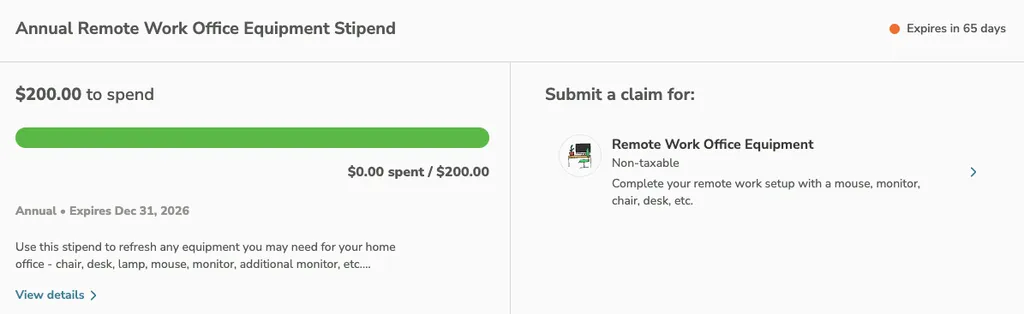
The final consideration in this step is the information employees see when they open Compt. The main things your team will be able to see are their available allowances, benefit descriptions, eligible expenses, and reimbursement instructions.
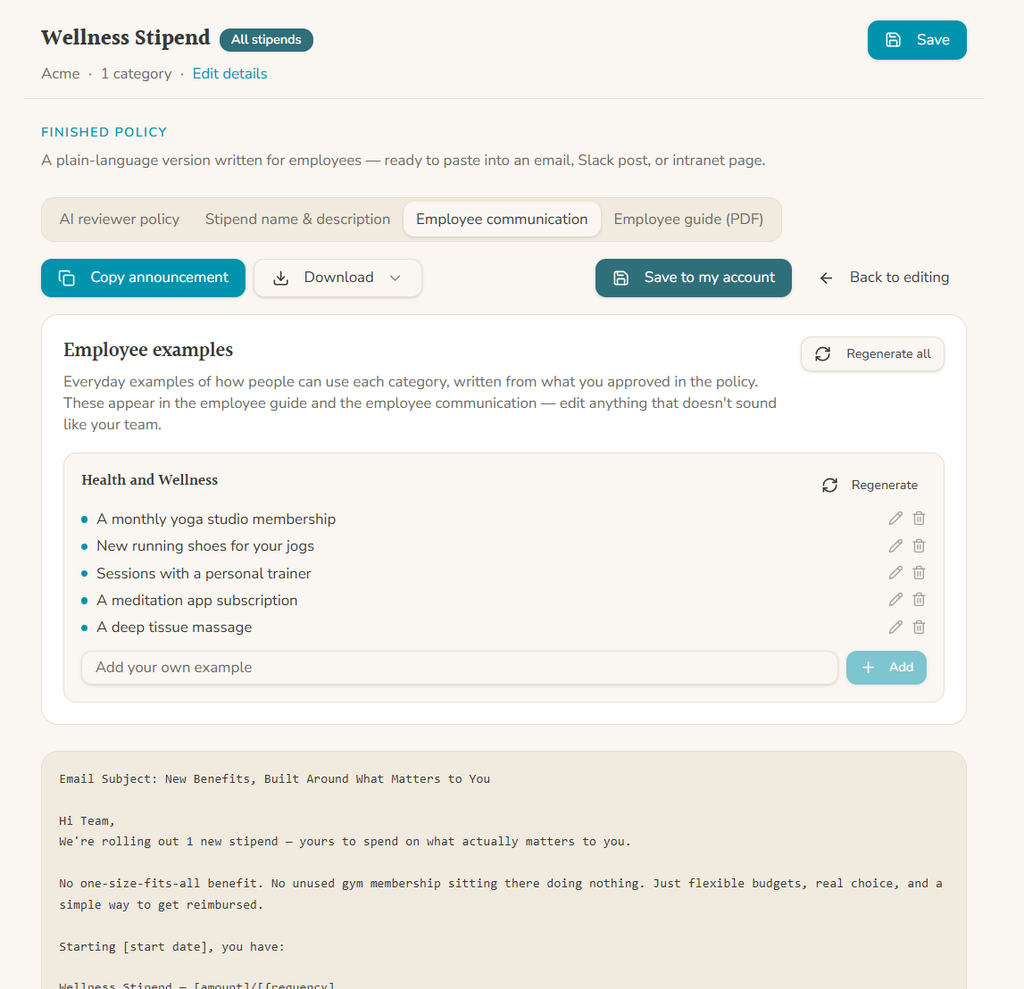
Compt also gives new customers a customized launch one-pager and set of employee FAQs, which your team can adapt to its specific program. You can also use Compt’s FREE Stipend Policy Builder tool to create a customizable stipend policy, employee communication templates, and a branded employee guide PDF based on your program’s rules at any point in the process (yes, even before you become a customer!).
6. Communicate the switch to employees.
The one-pager and FAQs are meant to help employees understand their new benefits when you announce the transition, but you also need to give them clear instructions for closing out expenses with their previous provider and getting started with Compt.
You’ll want to cover the following:
- When to stop using the old provider
- When Compt becomes available
- What’s staying the same
- What’s changing
- What happens to existing allowances and claims
- When employees will be reimbursed
Compt’s Stipend Policy Builder can draft employee communications based on your program’s categories and policy rules. If you’re switching providers, you’ll also want to add the migration-specific details, including cutoff and launch dates, instructions for outstanding claims, and reimbursement timing.
Here’s an example of what that communication could look like:
Hi team,
We’re moving our [LSA/stipend program] from [current provider] to Compt on [launch date] to make managing and using your benefits easier.
Here’s what you need to know:
- What’s staying the same: [Existing benefits, allowance amounts, and eligibility rules that aren’t changing.]
- What’s changing: [Any updates to benefits, policies, or how expenses are submitted.]
- Before [cutoff date]: Submit any outstanding expenses through [current provider]. Claims already submitted will continue to be handled through our existing process.
- Starting [launch date]: You’ll be able to access Compt through [login instructions]. Your available stipend will reflect any eligible remaining allowances carried over from your previous program.
- Getting reimbursed: With Compt, you’ll purchase eligible items using your preferred vendors, submit receipts, and receive approved reimbursements through payroll on [reimbursement schedule].
We’ll send you a getting-started guide and FAQs before launch.
Questions? Contact [HR/Benefits contact] for help with the transition.
Thanks!
[HR/Benefits Team]
7. Test your new LSA program before launch.
Before the platform goes live, Compt’s implementation team will work with you to complete a final round of checks to make sure that:
- Employees can log in and see the correct benefits and allowances.
- Eligibility rules and expense submissions work as expected.
- Payroll reporting is configured correctly, including reimbursement amounts and applicable tax classifications.
- Employee invitations and onboarding materials are ready to go.
If everything looks good, you’ll be ready to launch your LSA program.
8. Launch and monitor the first reimbursement cycle.
Keep an eye on the first expense submissions once you’re up and running, and pay attention to the questions employees ask your HR team. If the same issues keep coming up, you might have to clarify your instructions and potentially make adjustments to the program setup.
After the first reimbursement cycle, have your payroll team confirm that approved reimbursements were paid correctly and that the amounts and applicable tax classifications were accurately reflected in payroll.
And still don’t forget about your old provider. Stay on top of your outstanding reimbursements until they’re settled, or else some team members might miss payments or get reimbursed twice.
Switch to Compt with confidence.
Compt supports transitioning existing stipend and LSA programs, whether you want to maintain your current benefit structure or consolidate multiple benefits into one platform. Its vendor-agnostic approach gives employees the freedom to choose where they spend their allowances, as long as purchases meet your policy.
With Compt’s reimbursement model, you don’t need to prefund employee allowances. Your benefit dollars stay with your business until employees submit approved expenses, and automated workflows can reduce benefits administration to as little as 10 minutes per month.
And with dedicated implementation support, most teams are rolling within two to four weeks.
Already offering stipends or LSAs? Request a Compt demo to see how we can simplify your existing program and make the switch as smooth as possible.

FAQs: How to switch LSA and stipend providers
Compt can carry forward unused employee allowances when you switch providers, but it doesn’t import historical claims or transaction records. To preserve both, your team should reconcile each employee’s remaining allowance after the old provider’s cutoff and supply the finalized amounts to Compt for configuration.
Before your previous provider closes access, export and retain employee spending histories, reimbursement reports, and other financial records separately. Outstanding claims should be tracked and resolved through your previous provider’s process to prevent missed or duplicate reimbursements.
Can we switch LSA providers in the middle of the year?
Yes. You can switch to Compt midyear without waiting for your next annual benefits cycle. The best transition date will depend on your current provider’s contract, employee funding schedule, payroll calendar, and outstanding reimbursements.
If you’re switching between funding periods, you’ll likely need to reconcile unused employee allowances and determine which purchase dates your new policy will cover. Launching at the start of a new funding cycle can simplify that process, but it isn’t required.
What happens to pending reimbursements when we switch LSA providers?
Compt doesn’t import outstanding claims from another provider, so your previous provider’s reimbursement process needs to remain in place until those claims are resolved.
Before switching, document all pending claims and confirm the final submission deadline. Your team should also establish how expenses purchased before the cutoff but submitted afterward will be handled. Make sure employees know which platform to use and when they can expect payment.
Can we switch from a benefits debit card platform to Compt?
Yes. You can replace a card-based LSA or stipend platform with Compt’s reimbursement-based approach, and it’s one of the most common reasons employers decide to switch. Employees purchase eligible items from vendors of their choice, submit receipts through Compt, and receive approved reimbursements through payroll.
This removes benefits-card merchant restrictions and eliminates the need to prefund employee allowances. The tradeoff is that employees pay upfront and wait for reimbursement, so it’s important to explain that change before launch.
Read more from Compt CEO Amy Spurling on the reimbursements vs. debit cards decision.
How can we prevent interruptions to employee benefits when switching providers?
A successful switch to Compt starts with a coordinated cutoff and launch plan. Your HR, Finance, and IT teams work with Compt’s Customer Success team to confirm program rules, reconcile remaining allowances, configure employee access, and test payroll reporting before the new platform goes live.
Employees should receive clear instructions about their last day to submit expenses through the previous provider, their Compt launch date, and how outstanding claims will be handled. After launch, review the first reimbursement cycle to catch any issues early.
Read more about how Compt’s implementation process works.
Which employee stipend providers help with setup and employee onboarding?
Compt provides hands-on implementation and employee onboarding support for employers switching stipend or LSA platforms. Every customer receives a dedicated Customer Success Manager who guides program configuration, HRIS and payroll setup, employee eligibility, and launch preparation.
Compt also provides a customized employee launch one-pager and FAQs that your HR team can adapt.
Before launch, Compt works with your team to verify the configuration and employee access. When switching from another provider, you’ll also need to communicate cutoff dates, outstanding reimbursement instructions, and how remaining allowances will be handled.
How can we combine our wellness, remote-work, and learning benefits into one platform?
Compt lets employers consolidate separate wellness, remote-work, and learning stipends into one all-inclusive Lifestyle Spending Account (LSA), or manage them as separate programs within the same platform. You can configure eligible expenses, funding amounts, and eligibility rules for each program without maintaining separate benefits vendors.
If you’re migrating existing benefits, document each program’s policies and outstanding claims before the switch. Compt can configure reconciled, unused employee allowances supplied by your team, but historical claims and spending records from previous providers must be exported and retained separately.
How long does it take to get started with Compt, and what support is included?
Most Compt customers launch their stipend or LSA programs within two to four weeks, including platform configuration and integrations. A dedicated Customer Success Manager coordinates the five-phase implementation process, covering program planning, configuration, system connections, employee communications, and launch.
The timeline will depend on the complexity of your eligibility rules, HRIS and payroll systems, SSO setup, and internal approvals. Compt handles the platform-side configuration, while your HR, IT, and Finance teams provide the necessary information and validate the setup.
For context, Carrot Fertility launched Compt in two weeks for more than 300 remote employees across 40 states.
Can you help me build a business case for switching from point-solution perks to a single perk stipend platform?
Compt’s Lifestyle Benefits product includes unlimited stipend programs (both recurring allowances and spot bonuses), rewards and recognition, employee discounts, and corporate swag. That means you can potentially replace several point solutions, stipend tools, card programs, and manual tracking processes with one platform.
Compt uses a fixed annual software fee based on headcount rather than per-employee-per-month (PEPM) pricing and doesn’t require employers to prefund allowances or benefits wallets. Your benefit spending remains separate from the software fee, and unused benefit dollars stay with your company.
For a real-world example, TEN7 replaced PEX cards and spreadsheets with Compt to manage wellness, technology, professional development, and recognition stipends. The team now spends approximately 5–10 minutes per month administering its benefits.
To build a business case for switching, compare your current software fees, administrative workload, prefunding requirements, and employee experience against the cost and capabilities of a consolidated platform. The strongest business case should quantify the systems you can retire, administrative time you expect to save, and any improvement in employee access or flexibility, rather than assuming consolidation automatically lowers costs.
Editor’s note: Compt software supports the categorization and proper reporting of benefits according to IRS guidelines, helping businesses maintain compliance. However, Compt cannot provide tax advice, and users should consult their own tax, legal, and accounting advisors when necessary.

 No receipt chasing