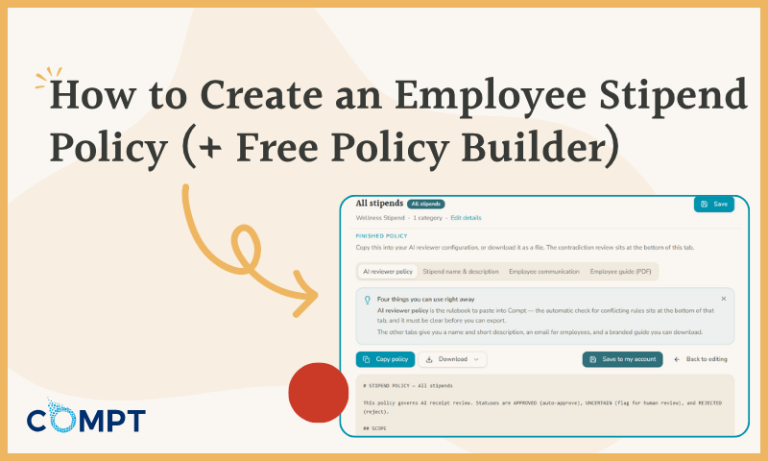

An employee stipend policy should spell out the specifics of who is eligible for the benefit, how much funding employees receive, when that funding becomes available, what employees can and can’t spend the funds on, what documentation they need, and how reimbursements will be handled.
That sounds straightforward until you actually have to write one.
Does a gym membership qualify? What about running shoes? What happens if a receipt includes one eligible item and one excluded item? How late can an employee submit an expense? What happens when an employee goes on leave halfway through the funding period?
I’ve spent nearly five years helping Compt customers launch and run stipend and LSA programs, and I’ve seen how quickly the same questions pile up when an awesome benefit idea doesn’t have enough guidance behind it. So, I built Compt’s free Stipend Policy Builder to help our customers (and future customers!) begin with the decisions they actually need to make for their stipend or Lifestyle Spending Account (LSA) program instead of staring at a blank document.
You choose the categories you want to include, review and customize the rules (which start from Compt’s established defaults), and then work through both regular and unusual cases you know matter to your employees. The Stipend Policy Builder then turns those decisions into a structured stipend policy, employee communication templates, and an employee guide, all editable so you can tailor them to your company.
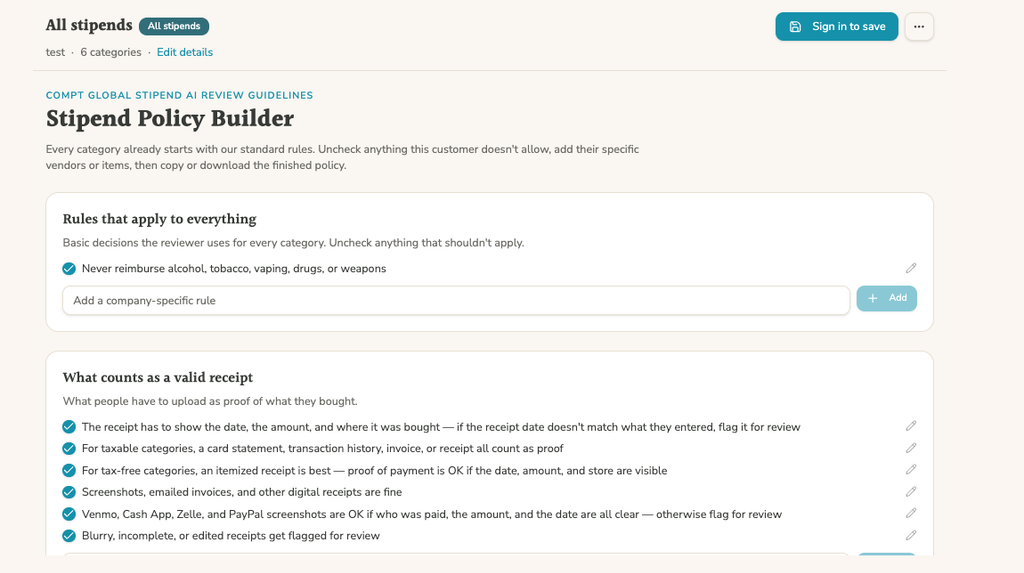
Your employee stipend policy, simplified.
Build a clear, customizable stipend policy for what’s covered, who’s eligible, and how expenses are handled. The Stipend Policy Builder starts with Compt’s LSA policy guidelines and lets you tailor the rules to your program.
What should an employee stipend policy include?
A good employee stipend policy should cover employee eligibility, funding, included and excluded expenses, documentation requirements, tax treatment, and what happens when an expense falls into the dreaded gray area. Let’s take a closer look at each step:
1. Start with who receives the benefit and how much they get.
Your policy might apply to every employee equally, or eligibility and funding might vary by location, department, employment type, seniority, or another defined employee attribute. Compt supports custom eligibility rules for stipends and Lifestyle Spending Accounts (LSAs).
Be specific here. Maybe your Engineering department gets an additional professional development stipend for AI upskilling, remote employees qualify for different categories than office-based employees, or funding amounts vary by location. If you already know those differences exist, your policy should spell them out rather than leaving employees to figure out which version applies to them.
With Compt, those eligibility groups can use HRIS fields and custom groups, so a change in employee data can move that person into the appropriate benefit group automatically. Tenure-based benefits are usually handled through anniversary stipends tied to an employee’s hire date.
2. Define precisely what employees can (and can’t) spend their stipend on.
This is usually where the easy part ends.
“Health and wellness” sounds perfectly clear as a stipend category until somebody submits a receipt for running shoes. Or vitamins. Or a massage. Or a $2,500 home-fitness machine.
Maybe all of those are fine, or maybe you consider only the vitamins and fitness machine eligible. (We have a ton of cool examples of how customers use wellness stipends!) Your stipend policy should be specific enough that employees understand what qualifies, reviewers know which types of expenses need a closer look, and everyone knows what is 100% out of bounds.
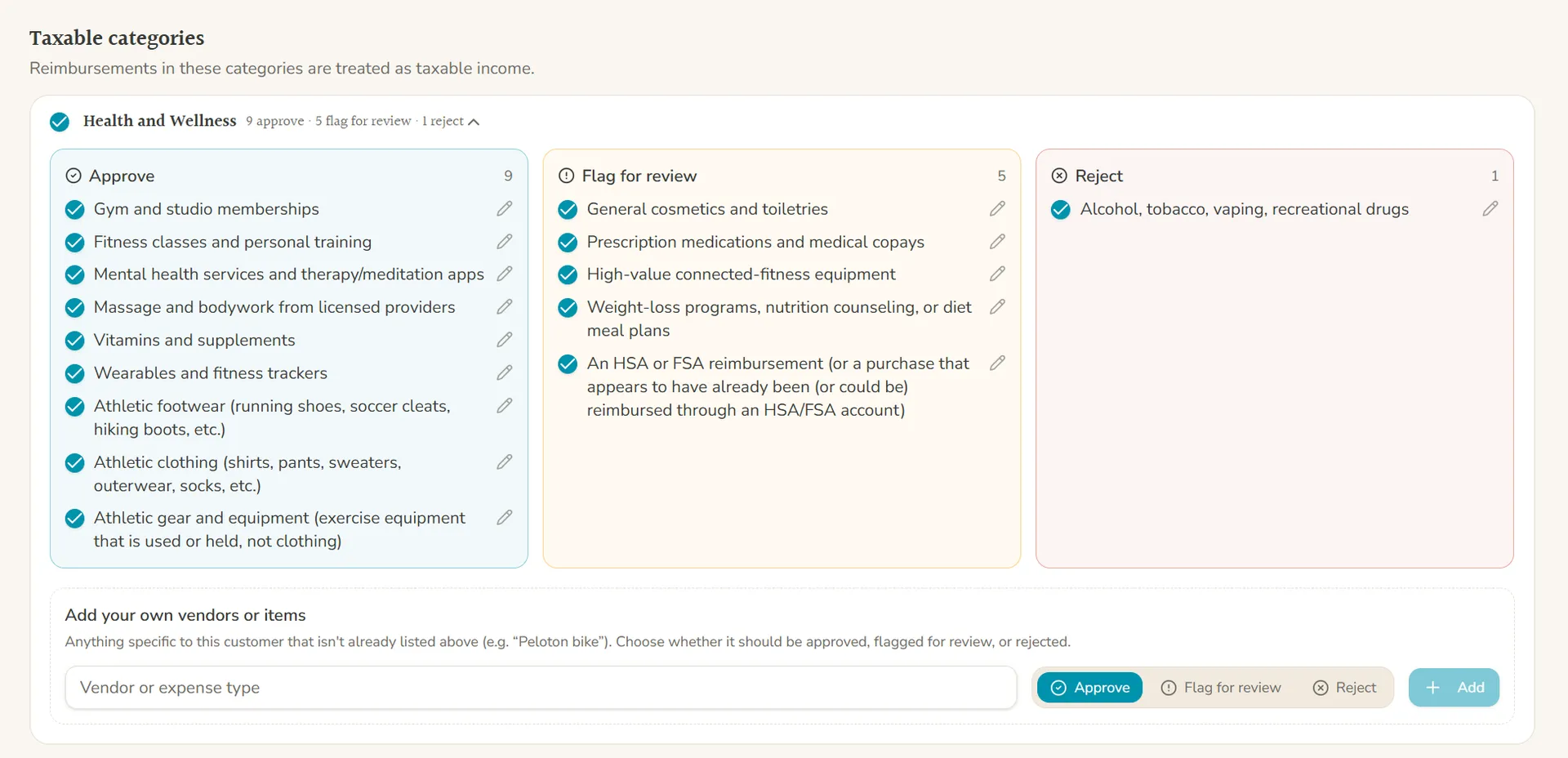
The Stipend Policy Builder starts each category with Compt’s established rules, organized into expenses to approve, flag for review, or reject. You can keep those defaults, remove anything that doesn’t fit your company, and add your own vendor- or expense-specific rules.
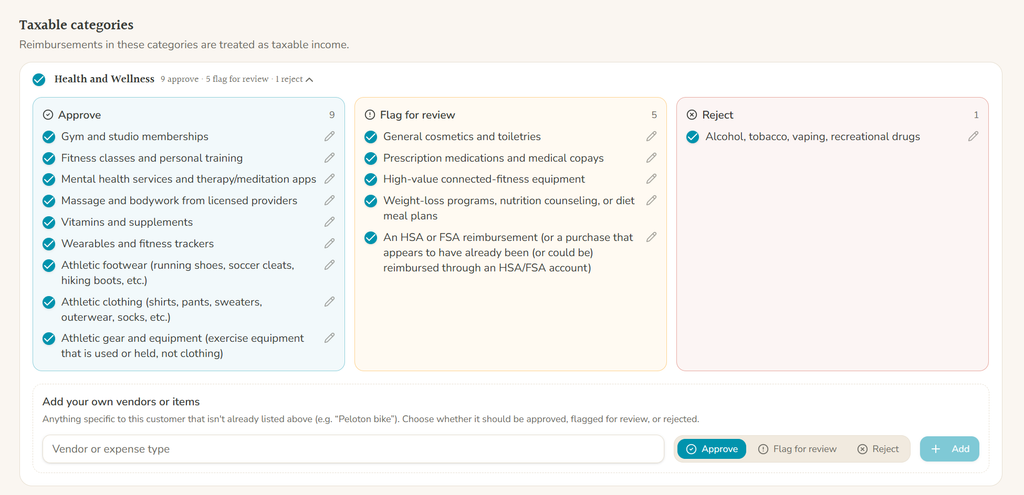
For example, you might approve gym memberships and running shoes but reject athleisure clothing purchases, flag high-value connected fitness equipment for review, and exclude tobacco products and alcohol entirely.
And you absolutely do not have to anticipate every bizarre receipt anyone will ever submit. (Your employees will eventually surprise you. I promise.) Your policy’s goal is to make the common cases clear and give reviewers instructions for the genuinely unusual ones.
3. Decide what counts as acceptable documentation.
Receipts seem like another obvious decision until … they aren’t.
Can employees submit a screenshot? What about an emailed invoice? A credit card transaction? Venmo? What happens if the receipt is blurry, the purchase date doesn’t match the date on the claim, or the employee submits only part of a larger receipt? Your policy should answer those questions before they turn into Slack messages or panicked emails.
The Stipend Policy Builder includes default receipt requirements covering traditional receipts, invoices, transaction histories, screenshots, digital receipts, and payment-app confirmations. You can edit them or add company-specific rules based on how you want your program to work and what will satisfy your Finance team’s documentation and audit requirements. For expenses that may qualify for nontaxable treatment, getting those documentation rules right is really important.
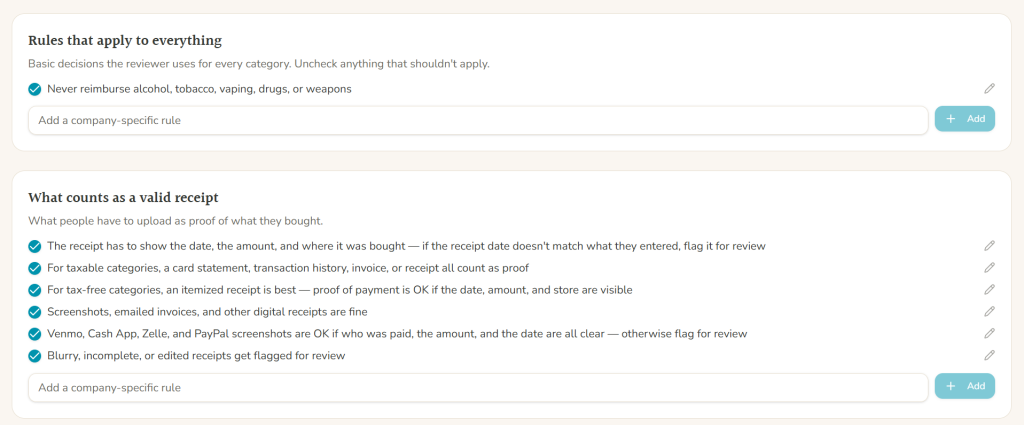
I’ve also seen many situations where unclear documentation can turn into the same question being answered over and over by HR. One thing I wanted to solve with this tool was the constant reinvention of the same decision: If a PayPal confirmation is acceptable when it shows the merchant, date, amount, and eligible purchase, write that down once and make sure everyone knows where to find it. Problem solved.
4. Set the timing rules.
Your policy also needs to explain when employees can spend and submit. That includes the stipend funding period, which purchase dates qualify, how long employees have to submit receipts, and what happens when an expense lands right on the edge of a funding cycle.
Use the Stipend Policy Builder to decide and document your acceptable receipt timeframe, then carry that same rule into your Compt company settings when you set up your program so employees know exactly which purchase and submission dates apply.
And if your program uses accrual-based funding, spell that out too. Employees should know whether their available balance builds during the cycle and whether unused funding carries forward, expires, or follows another rule.
5. Address tax treatment by category.
An expense being eligible under your company’s stipend policy does not automatically make the reimbursement nontaxable. Those are two separate questions. The Stipend Policy Builder separates taxable categories from categories that may qualify for nontaxable treatment in the U.S., helping you address that distinction while you’re actually building the policy instead of leaving it for payroll to sort out later.
That doesn’t replace a tax or legal review, which should always be an internal checkbox when you’re designing your policy. The Stipend Policy Builder can help you build compliance checks into the policy by spelling out what receipt reviewers should look for with nontaxable expenses. For example, you might require an itemized invoice, documentation in the employee’s name, or other proof needed to support the tax treatment. That gives the receipt reviewer clear red flags to look for when evaluating the claim.
6. Decide what should happen when the answer isn’t obvious.
Every stipend or LSA program will eventually encounter an expense that doesn’t fit perfectly into an obvious category. In my experience with Compt customers, those are usually the questions that create the most back-and-forth: the purchases well-intentioned leaders simply didn’t think to address when the policy was first written. You don’t need to dream up every possible weird purchase on your own, either. The Stipend Policy Builder walks you through the common areas where questions tend to come up and gives you Compt’s established rules as a starting point.
That’s why the Stipend Policy Builder includes a “flag for review” state alongside “approve” and “reject.” If the policy doesn’t clearly address an expense, you can set it aside for a real person to look at instead of forcing an automatic decision. That same philosophy carries into Compt’s AI-assisted Claim Reviewer: AI can apply the policy, surface context, and explain its recommendation, but it does not automatically reject an employee’s claim.
How to create an employee stipend policy
You can absolutely build all of the above in a Word doc from scratch. I know because until I created this tool, Compt customers did it all the time. And because of that, I also know how long it can take when every sentence creates another question, which is why I created a guided process for you to walk through.
Here’s what the process looks like in the Stipend Policy Builder:
- Choose your stipend categories.
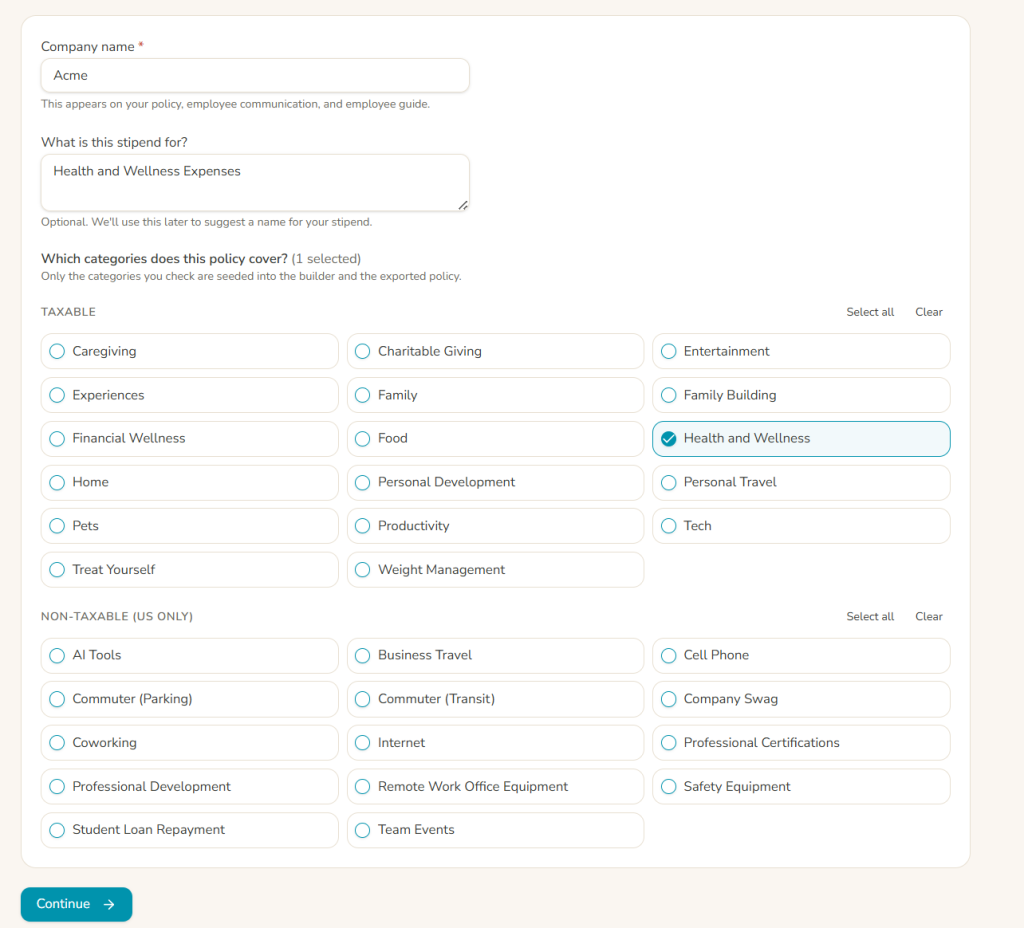
Enter your company name, describe what the stipend is meant to support, and select the categories you want to include. You can create one overall policy across multiple stipend categories, or build custom policies for individual stipends when different programs need their own rules.
The builder starts with Compt’s established category rules, but nothing is locked in. The whole point is to give you a useful place to start (without pretending every company should have the exact same policy).
- Customize your programwide rules.
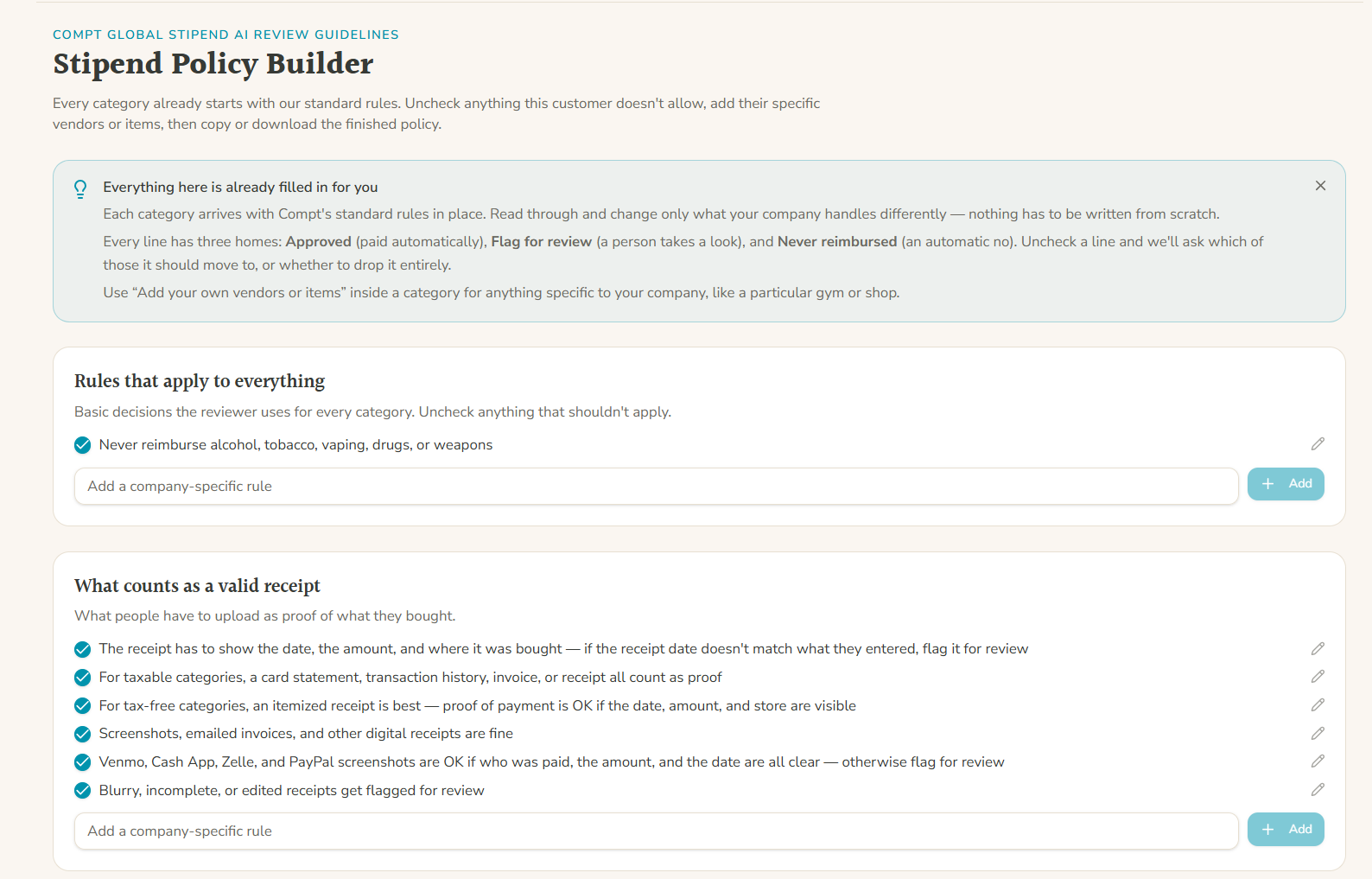
Next, review the rules that should apply across every category. These include universal exclusions and receipt requirements. Keep what fits, remove what doesn’t, and add anything specific in the available text box.
- Review each category.
Now you get into the finer details. For every category you selected, you can see what the default policy would approve, flag for review, or reject. You can edit or remove individual rules and add vendors or expense types that are unique to your program.
This is probably the most important part of the process because it’s where “we offer a wellness stipend” becomes an actual set of instructions people can follow. - Check your finished policy.
When you’re done, the builder creates the full reviewer policy from your choices and checks it for contradictions and rule conflicts.
I added that contradiction check to the tool because long policies can get weird fast. A universal rule might accidentally conflict with a category-specific rule, or two instructions might send the same expense in different directions. Better that the Stipend Policy Builder catches those nuances before an employee does.
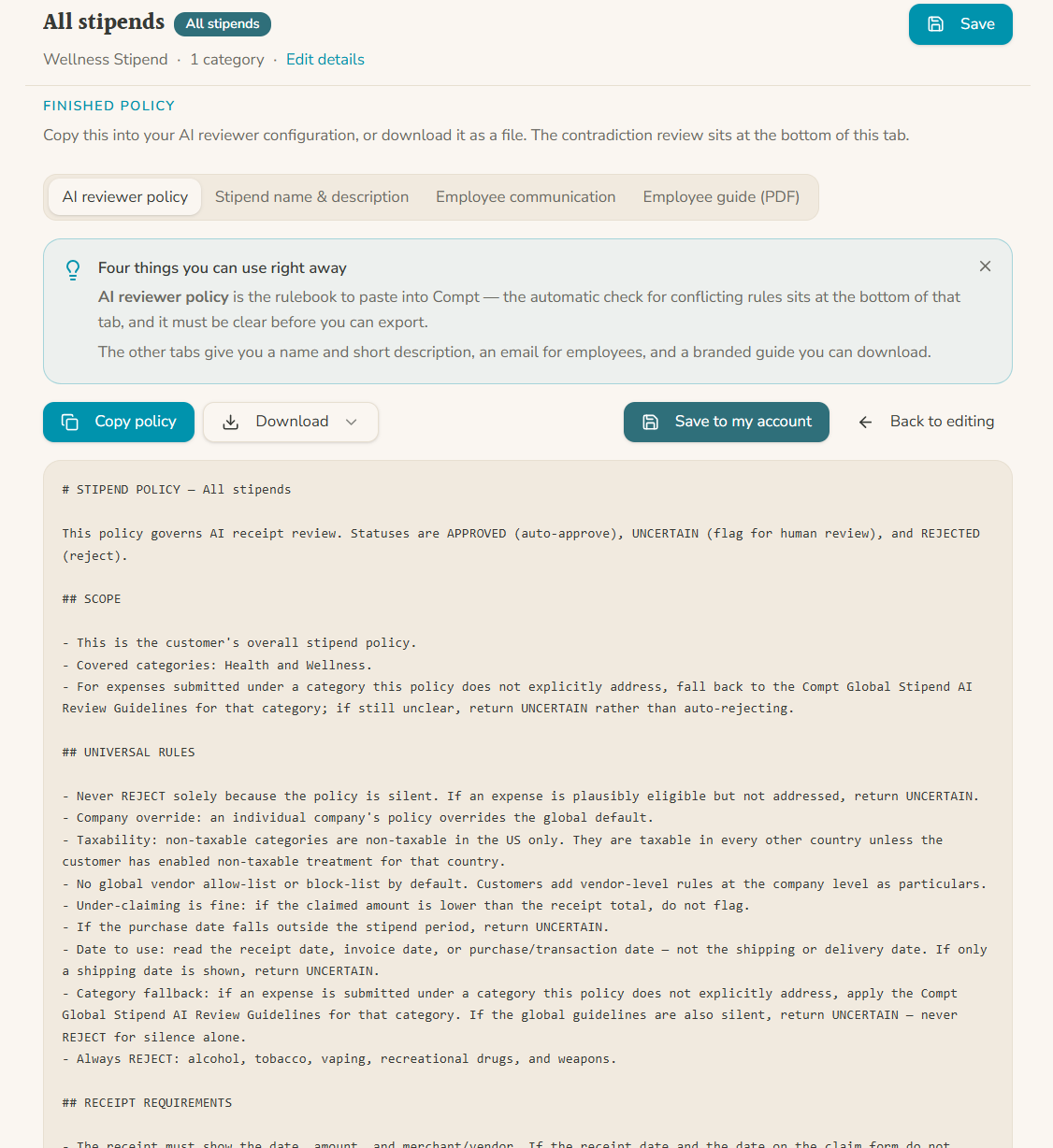
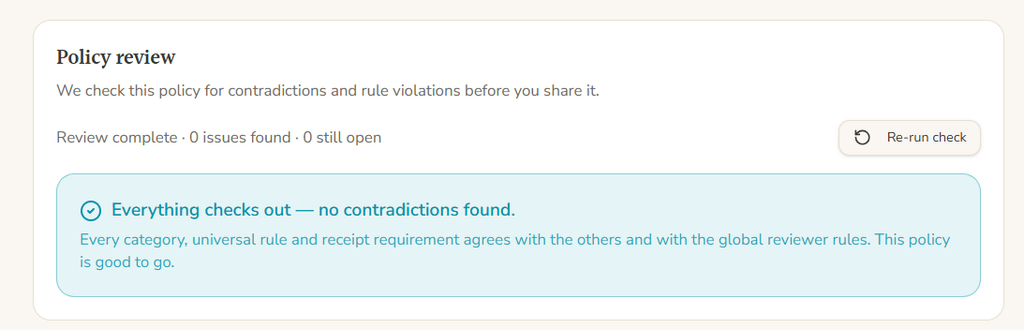
What does the Stipend Policy Builder give you?
One big goal I had for the Stipend Policy Builder was that I did not want the end result to be one beautifully formatted policy that nobody ever opens again. Here’s what’s included with this free tool.
Your custom employee stipend policy, as well as an editable stipend name and description for your Compt stipend or LSA program:
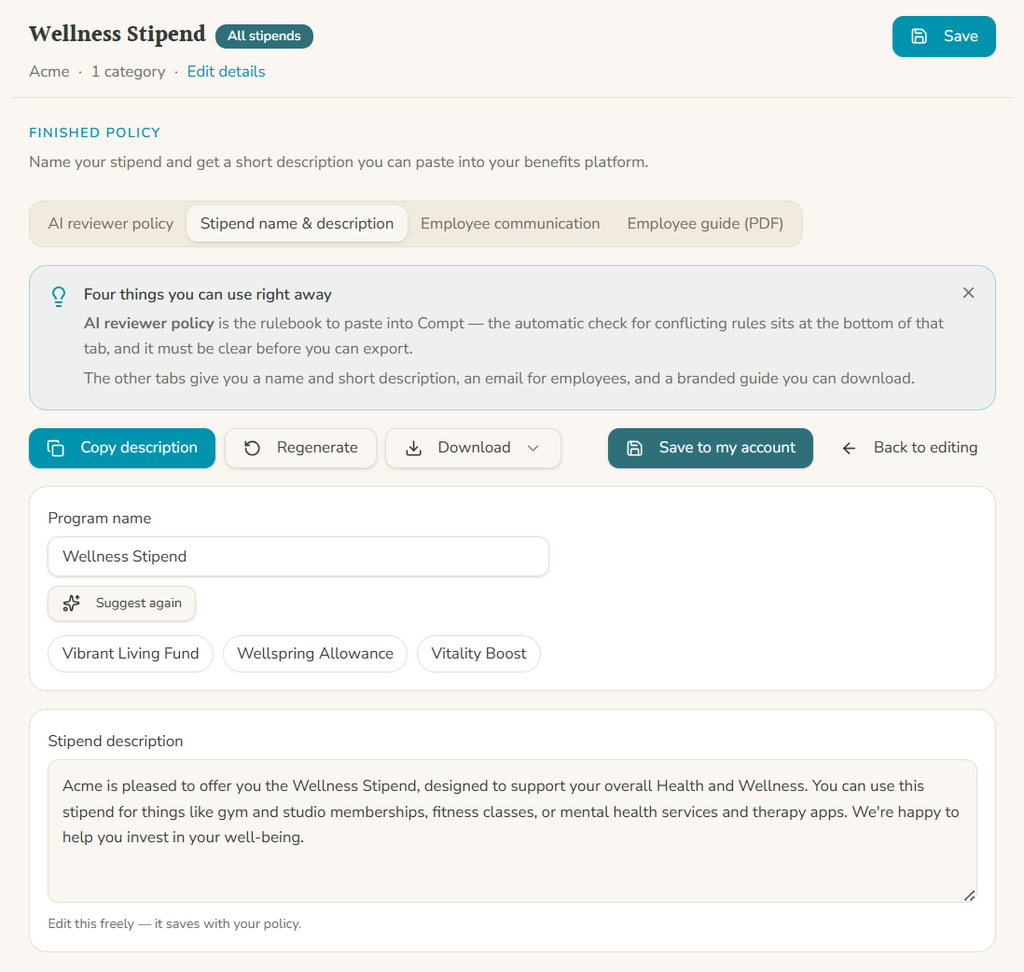
Employee communication templates, including examples of how employees can use each category based on the rules you approved:
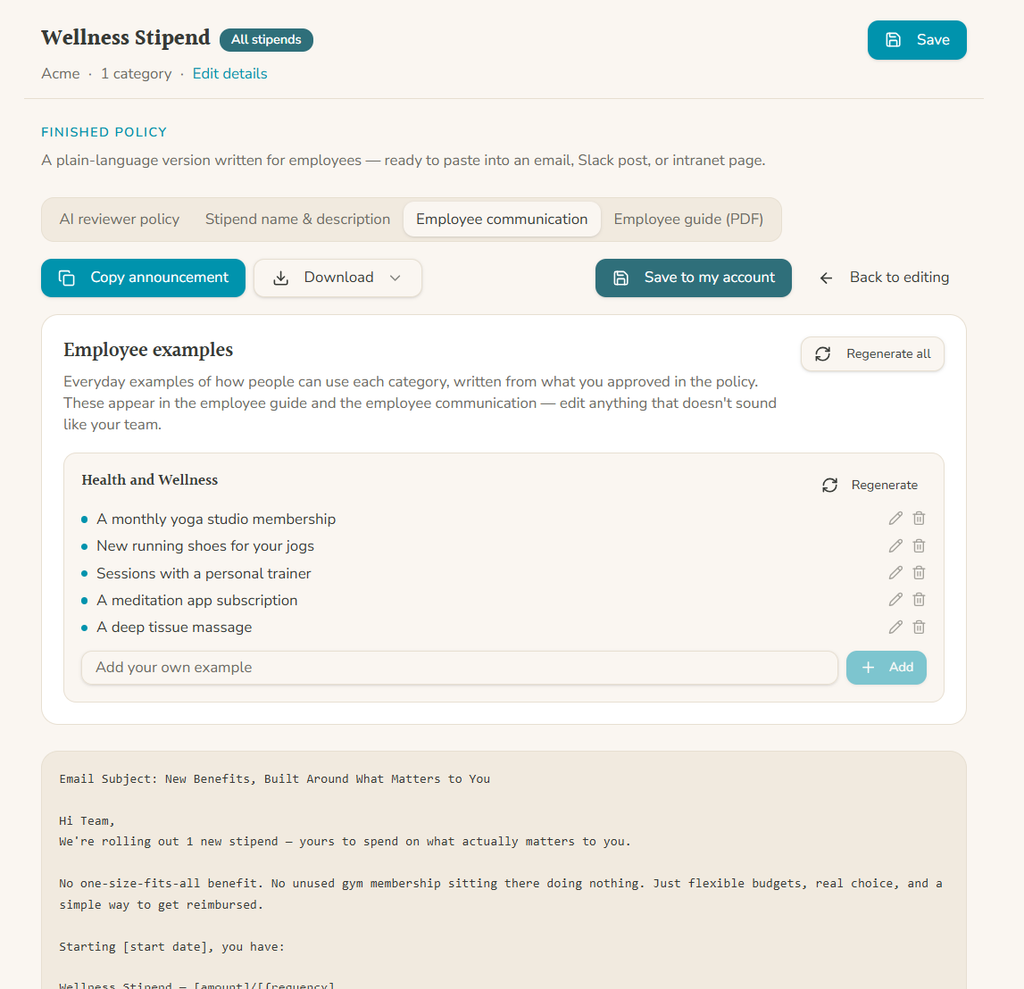
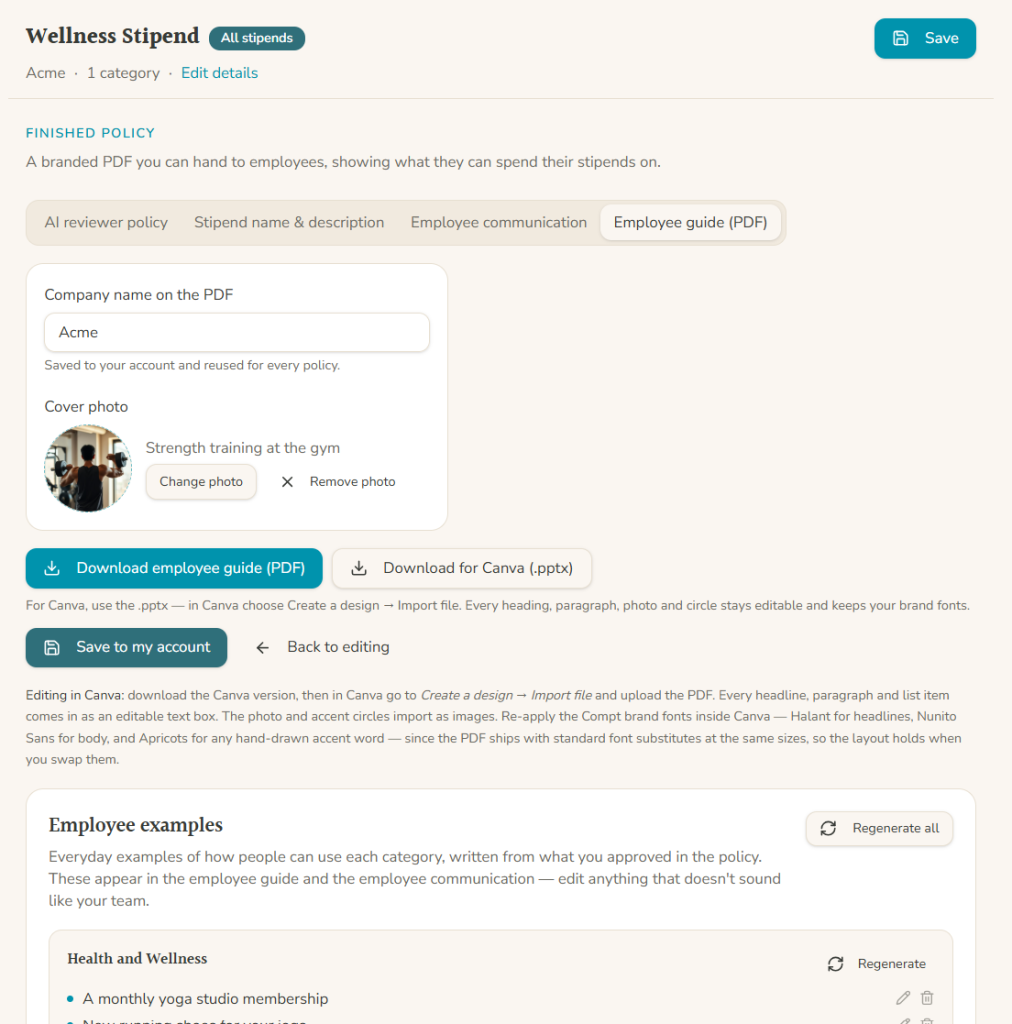
Branded employee guide PDF to add to your intranet, benefits portal, onboarding materials, or wherever your employees actually go looking for answers:
How Compt helps you put your stipend policy to work
The best stipend policies don’t get filed away after open enrollment. In an ideal world, your employees will view your policy to decide what they can buy, reviewers will use it to help them make decisions when a claim comes in, HR will refer to it when someone asks why an expense did or didn’t qualify, and Finance will rely on it to keep reimbursement and tax treatment consistent.
Compt uses that same policy throughout the program, including in AI-assisted claim workflows that can read documentation, apply the employer’s rules, surface possible issues, and explain a recommendation. But that only works well when the rules underneath the technology are specific enough to apply consistently.
That’s the idea behind the Stipend Policy Builder: put the work into the rules once, then let Compt help you use those rules consistently after launch. If your current stipend policy is two paragraphs in an employee handbook — or, ahem, exists only as a dream in your head — give the builder a try.
And if you’re interested in adding employee stipends or an LSA to your employee benefits package, request a Compt demo today.

FAQs: Employee stipend policies (2026)
An employee stipend policy should include eligibility, funding amounts and cadence, included and excluded expenses, receipt requirements, submission deadlines, and tax treatment. Compt’s Stipend Policy Builder walks employers through each of those decisions and turns them into one structured policy.
Your LSA or stipend policy should also explain what happens when an expense falls into a gray area. Clear rules for what can be approved, what needs review, and what is excluded give employees and reviewers the same starting point.
Can we change our employee stipend policy after the program launches?
Yes, stipend policies aren’t set in stone, and your program may need to change as your workforce or benefits strategy changes. In Compt, employers can update eligibility, categories, funding amounts, and other program rules after launch.
When an employee moves between eligibility groups, admins can choose whether the new amount takes effect immediately, on the first of the following month, or at the start of the next benefit cycle. Your written policy should explain when changes take effect so employees know which rules and funding amounts apply to them.
What happens to an employee’s stipend when they go on leave?
How leave affects a stipend depends on the rules you set for the program. In Compt, stipends can be paused for employees on applicable leave and reactivated when they return. Employee data from an integrated HR system syncs to Compt by default (or can be uploaded via CSV), so employee status changes flow into your LSA or stipend program without you or anyone else on your HR team manually maintaining a spreadsheet.
How long do employees have to submit receipts in their employee stipend program?
You decide the acceptable receipt-submission window for your program. In Compt, employers can set that timeframe and then use their written policy to make both eligible purchase dates and the submission deadline clear to employees.
Writing that deadline down gives employees a clear rule and saves HR from deciding whether a three-month-old receipt is “close enough” every time one appears.
Who reviews employee stipend claims, and does anything get rejected automatically?
Compt does not automatically reject employee claims. Claims are reviewed by a customer administrator or, for qualifying programs, through Compt-managed expense review, while AI-assisted tools provide context and recommendations.
Customers can automate qualifying high-confidence approvals under rules they control. Claims that may need to be rejected, contain discrepancies, or require judgment go to a person for review.
Can a stipend policy set different eligibility rules by location, department, seniority, or other employee attributes?
Yes, Compt lets employers build stipend eligibility groups using employee attributes such as department, location, employment type, and seniority. Employers can combine those rules and use custom columns for company-specific eligibility criteria.
Tenure-based benefits work differently in Compt and can be handled through anniversary stipends tied to an employee’s hire date. Your policy should make the underlying eligibility rules clear so employees understand which benefits apply to them.
Should an employee stipend policy explain how reimbursements are taxed?
Yes, your policy should explain how reimbursements will be taxed so employees, HR, Finance, and payroll know what to expect. Compt’s Stipend Policy Builder separates taxable categories from categories that may qualify for nontaxable treatment in the U.S., making tax treatment part of the policy-design process. For employees in other countries, taxability can be customized based on local requirements.
An expense being eligible under your company’s stipend policy does not automatically make the reimbursement nontaxable. Eligibility is determined by your company’s policy; tax treatment depends on the applicable tax rules.
What are common mistakes to avoid when creating an employee stipend policy?
The biggest mistakes are vague eligibility or category rules, unclear exclusions, missing receipt requirements, undefined submission deadlines, and no plan for edge cases. Compt’s Stipend Policy Builder is designed to surface those decisions while you’re creating the policy instead of after employees start submitting expenses and asking questions.
Another mistake I see is companies storing their detailed reviewer instructions in one place and vague employee guidance in a different place. The Stipend Policy Builder creates both from the same underlying decisions, so employees and reviewers have access to the same consistent rules at all times.

 No receipt chasing