
Rolling out a Lifestyle Spending Account (LSA) program is as much a systems decision as it is a cultural one. Whether it runs cleanly or creates ongoing work for HR and Finance depends on how it connects to the infrastructure you already have.
Payroll in 2026 is structured and standardized, so it’s predictable. LSAs aren’t, unless you’ve intentionally designed one to be. Without the right setup, you end up with manual uploads and inconsistent reporting that create huge compliance risk.
This guide covers everything you need to confirm before you launch.
How LSAs actually connect to payroll, HRIS, and finance systems
To run an LSA program, three platforms have to come together: HRIS, LSA software, and payroll.
- HRIS feeds roster updates, new hires, terminations, and eligibility changes into your LSA platform.
- Your LSA platform takes that data, runs it through approvals, categorization, and policy enforcement, then outputs structured, payroll-ready reimbursement data.
- Payroll receives that output and processes compensation and tax withholding.
Importantly, the LSA doesn’t live inside payroll; you need a dedicated system. When a stipend runs through payroll as wages, it’s just additional compensation. The money hits the paycheck automatically whether the employee does anything with it or not.
But most LSA programs don’t hit 100% utilization, which is why a reimbursement-based LSA platform is the smarter financial move — you set the upper limit based on your budget but only pay out what employees actually claim. The rest stays in your pocket.
With the reimbursement approach, you end up saving money in the end (and more importantly, not wasting it).
Integration checklist: What to confirm before rolling out an LSA
For Lifestyle Spending Account payroll integration, there are seven things every HR leader needs to test and check off before their LSA program goes live:
1. Employee data sync (HRIS to LSA platform)
Confirm how your LSA platform receives employee data from your HRIS. Most modern platforms connect via API and sync automatically. This integration adds new hires, removes terminated employees, and updates eligibility changes without HR touching anything.
If your vendor requires you to upload a CSV on a schedule, that’s manual roster maintenance that will inevitably create gaps. Someone goes on leave, someone gets terminated, someone changes departments — and your LSA platform doesn’t know yet. What you want is a live connection where your HRIS is the single source of truth and your LSA platform just listens.
2. Expense categorization and tax handling
Your LSA platform is supposed to classify every expense as taxable or nontaxable at the transaction level — that is, before it hits your payroll system. So ask your vendor directly: are expenses categorized as taxable or nontaxable at the point of approval, before anything hits payroll? That’s how Compt does it. If the answer is no, that work lands on Finance.
For multi-state teams, ask specifically how the platform handles state-level tax differences, since some states have additional rules around fringe benefit reporting. And for global orgs, confirm how the platform handles international tax classification. Compt defaults all non-U.S. categories to taxable, but lets admins configure taxability on a per-category, per-country basis — so, for example, if professional development is nontaxable in Canada but taxable in Singapore, you can reflect that. Compt then splits payroll reports by country, applying whichever rules you’ve set. The platform automates the output; your team is responsible for knowing the rules to configure.
3. Payroll input format and timing
Employee identifiers and their approved amounts, plus the corresponding expenses and their tax classifications, all need to map directly to fields your payroll system recognizes. Otherwise, the system won’t be able to read it properly.
With automated SFTP transfer or a direct API integration (for ADP), your LSA platform outputs structured, payroll-ready data formatted for your payroll system, so there’s no manual reformatting required.
On timing: you need to configure the LSA platform’s approval cutoff to close before your payroll processing date. If approvals are still open when payroll runs, those reimbursements miss the cycle and roll to the next one. Then those employees won’t see them on their next paycheck.
4. Reporting and reconciliation workflows
There’s no universal standard report Finance teams use to reconcile benefits spend against payroll (it varies by payroll system and the API maps to its required fields automatically).
What doesn’t vary is what the report needs to contain: per-employee reimbursement amounts, taxable and nontaxable classifications, pay period references, and employee payroll IDs. Your LSA platform holds all of that data and should be able to export it in a single report Finance can match directly against the payroll run.
The one thing worth confirming during setup is that employee payroll IDs in your LSA platform match exactly what’s in your payroll system. If they don’t, the rest of the rows won’t map correctly either.
5. Approval workflows and automation
Once you have reconciliation sorted, there needs to be an approval chain within your LSA platform which every expense follows from start to finish. If you’ve already defined LSA-eligible expenses up front, this can mostly be automated.
First, the employee submits the receipt. Then, for standard expenses like a gym membership or home office equipment, many companies using Compt choose to auto-approve based on category eligibility rules without any human in the loop.
Manager approval only comes into play for higher-value expenses, out-of-policy submissions and categories where the company wants a human judgment call, like professional development above a certain threshold or expenses that don’t clearly fit a category.
Other companies using Compt opt to review every submission. It’s truly up to you.
6. Audit trails for each submission
Taxable fringe benefits are supposed to be reported as compensation and nontaxable ones need to meet specific IRS requirements (like substantiation for business expenses).
If the IRS questions whether a reimbursement was classified correctly, you need documentation proving the expense was eligible under the category it was classified in, that it was actually incurred by the employee, and that it was approved under a legitimate program.
Your LSA platform should store every receipt, plus its categorization and approval chain, with each action taken on that item time-stamped, but make sure it does this properly ahead of time.
7. Multistate and global considerations
Tax treatment of fringe benefits isn’t uniform across states. California, for example, requires employers to reimburse cell and internet expenses, while it’s discretionary in most others. Make sure your system is applying the correct rules for each employee’s location instead of making one blanket treatment across your whole workforce.
For global teams, the question is whether the platform supports consistent reimbursement workflows across countries or forces international employees into a separate manual process. (Compt supports reimbursements in 75+ countries, with employees receiving payment in local currency.)
Where LSA implementations typically break down
When LSA implementations break down, it’s almost always one of the same five things:
- Tax categorization deferred to payroll: Expense tools and card platforms defer tax treatment to month-end reconciliation rather than applying it at the point of approval, which creates compliance gaps.
- Manual roster maintenance: Manual uploads into payroll and spreadsheet workflows that are too slow once you scale headcount.
- Payroll ID mismatches: Data that can’t map correctly between systems.
- Approval window vs. payroll cutoff misalignment: Reimbursements missing cycles.
- Pre-tax platform limitations: Companies trying to run LSAs through HSA/FSA infrastructure which is governed by a completely different IRS publication (15-B vs. 969).
In other words, the failure isn’t usually payroll. Payroll does its job just fine. The issue is more with the Lifestyle Spending Account payroll integration itself, and whether you run LSAs using a dedicated reimbursement and expense management platform.
Why reimbursement-based LSAs simplify payroll integration
The benefits software that integrates best with payroll for lifestyle perk reimbursements isn’t the one with the most integrations listed on its website. It’s the one that produces clean, structured data before it touches payroll at all.
That’s the core advantage of a reimbursement-first model. Employees spend and submit a receipt, then the platform categorizes the expense, applies the right tax treatment, and routes it through an approval workflow before anything reaches payroll. By the time reimbursement data leaves the LSA platform, it’s already structured and totally compliant.
The downstream benefit of this is streamlined finance ops:
- Payroll runs faster because Finance isn’t reformatting data or making tax judgment calls at the last minute.
- Reconciliation is easy because every transaction has a receipt, a category, and a paper trail.
- Audits are defensible because categorization happened at the point of approval, not retroactively.
- And cash flow is predictable because you only pay for what employees actually claim.
In that sense, the LSA software is not just “another tool to integrate.” It’s the system that cleans everything up before it touches payroll. Payroll just processes the output.
What is “payroll-ready LSA data” supposed to look like?
Finance should expect three reports out of a well-configured LSA platform, each serving a different part of the workflow.
The Payroll report is what goes to payroll: Employee ID, employee name, total taxable reimbursement amount, and total nontaxable reimbursement amount — one row per employee, ready to apply to the pay run.
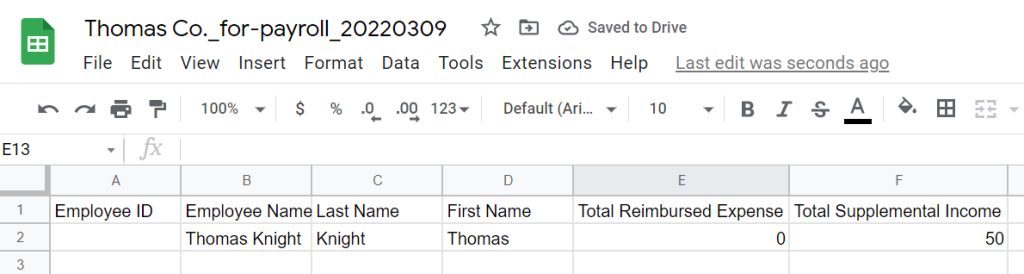
The Expense Details report goes deeper: every approved expense on its own line, with vendor, category, submission date, tax classification, and whether it was auto-approved. This is your audit trail.

The Finance report covers nontaxable expenses only. It’s formatted for GL and bookkeeping, so Finance can import nontaxable reimbursements directly without sorting through taxable transactions.

During Compt onboarding, we configure these reports to match your payroll system’s required format. You won’t need to map the fields by hand each cycle either; they’re set once and output consistently every pay run. For teams running multiple payroll providers — say, ADP for U.S. employees and Deel for international — Compt can generate separate reports for each group so data routes to the right system.
How Compt supports clean payroll integration without adding admin burden
Compt is a reimbursement-first lifestyle benefits platform that integrates cleanly with your existing payroll and HRIS infrastructure.
How?
- Your HRIS syncs employee data into Compt via API.
- Employees submit expenses.
- Compt handles approvals and tax classification.
- Reimbursement gets sent through payroll at the turn of the cycle.
- Structured payroll reports go to your payroll system for processing.
There’s less manual work (most of our customers spend 30 minutes per month on admin), and you have cleaner reports for your CFO and — equally importantly — for potential auditors.
What does Compt connect to, exactly?
Compt integrates with ADP, Workday, PeopleSoft, Rippling, BambooHR, and Gusto, among several other major payroll and HRIS systems.
For teams running ADP, Workday, or PeopleSoft: employee data syncs automatically via API and Compt can push payroll reports directly via SFTP, so there’s no manual download and upload required.
For teams running Rippling: Our dedicated Rippling guide covers the full setup and workflow in detail.
For other payroll providers: Compt generates structured, payroll-ready reports that can be delivered via SFTP or downloaded and uploaded manually. Any provider that supports SFTP file ingestion works the same way — and most major ones do.
What to expect from Compt LSA implementation
Payroll reports are configured to match your system’s required format during onboarding, so fields map correctly from day one. Most teams are fully onboarded, integrations included, in two to four weeks. The process runs in five phases: program planning, platform configuration, systems integration, communications prep, and launch.
Every customer gets a dedicated customer success partner from day one. Compt leads the kickoff, consults on program design, configures payroll and eligibility settings, sets up HRIS and payroll integrations, and builds your launch materials and employee FAQ. Your team’s job is to confirm details, connect your systems, and send the invite.
Common mistakes before rollout
The decisions you make during LSA setup determine how much ongoing work your HR and Finance teams carry every cycle. The following five mistakes are the ones that create the most avoidable admin burden.
1. Assuming “integration” means everything is automated
An integration between your LSA platform and payroll system means data flows between them. That in no way means every decision is made for you. For the LSA software to do its job, you’ll still need to properly set up approval workflows, funding cadences, and reporting formats at the beginning.
2. Not defining reporting requirements with Finance before launch
HR is going to own program design, but Finance can’t just be a downstream recipient of LSA data. They need to be in the room during setup to clarify how reports map to their GL and what the payroll output needs to look like.
3. Waiting too long to involve Payroll.
Payroll needs to know how the data is arriving, in what format, and on what schedule — before you go live, not after.
If HR owns the evaluation and Payroll doesn’t see a sample report until two weeks before launch, you’ll find out at the worst possible time that your approval cutoff is the same day as payroll processing. We’ve seen it happen. Get Payroll in the room early.
4. Underestimating reconciliation work.
If your LSA platform doesn’t produce a clean, Finance-ready reconciliation report, someone is doing that work manually every month. That cost compounds.
5. Treating the LSA as a standalone tool.
A Lifestyle Spending Account payroll integration only works cleanly when the LSA platform is treated as part of your payroll workflow. If instead the LSA platform is treated as separate, the decisions made during setup get made purely from a benefits administration perspective without accounting for how they affect payroll downstream.
What to confirm before go-live
Now for a quick recap. Before your LSA program processes its first payroll cycle, confirm the following:
- Your HRIS is pushing employee data into the LSA platform automatically via API
- The platform is applying tax classification at the point of approval, not after
- Finance has reviewed and signed off on the payroll report format
- Your approval cutoff closes before your payroll processing date
- Payroll has seen a sample report and confirmed the format works for their system
- A specific person on the Finance team owns the reconciliation workflow
- The platform is logging a complete audit trail for every transaction
Compt is built for seamless LSA payroll integration.
Most of the problems you’ll run into with LSA implementation are configuration issues. And most of those are avoidable by choosing the right setup in the first place.
If you already have a payroll and HRIS stack but need an LSA platform that connects to it cleanly, Compt is your tool. It connects directly to your existing HRIS/payroll systems, handles tax classification automatically, and gives Finance the reporting they need to close every cycle.
Request a personalized Compt demo to see how it works.
FAQs: Lifestyle Spending Account payroll integration
There are seven things to confirm before your LSA program processes its first payroll cycle. Compt’s integration checklist covers all of them: (1) your HRIS is pushing employee data into the LSA platform automatically via API; (2) the platform applies tax classification at the point of approval, not after; (3) Finance has reviewed and signed off on the payroll report format; (4) your approval cutoff closes before your payroll processing date; (5) Payroll has seen a sample report and confirmed the format works for their system; (6) a specific person on the Finance team owns the reconciliation workflow; and (7) the platform is logging a complete audit trail for every transaction.
On the ERP and payroll side specifically: Compt integrates with ADP, Workday, PeopleSoft, Rippling, BambooHR, Gusto, and more. For ADP, Workday, and PeopleSoft, employee data syncs automatically via API and Compt can push payroll reports directly via SFTP — no manual download and upload required.
Do these stipend platforms integrate well with our HRIS and payroll systems?
It depends on the platform and how it handles data before it ever reaches payroll. Compt integrates directly with the major HRIS and payroll systems — ADP, Workday, PeopleSoft, Rippling, BambooHR, Gusto — and is built specifically so that reimbursement data is structured, tax-classified, and payroll-ready before it leaves the platform.
The distinction worth understanding: an integration that moves data between systems isn’t the same as one that cleans that data first. Platforms that defer tax categorization to month-end reconciliation, or require manual roster uploads on a schedule, create compliance gaps and ongoing admin work regardless of how many integrations they advertise. What makes Compt’s integrations work cleanly is that expense categorization, tax treatment, and approval workflows all happen inside the platform, so Payroll receives structured, compliant output rather than raw data that Finance still has to sort through.
Any tips for integrating a flexible perks wallet with Workday so reimbursements show up on employee pay stubs?
The key is making sure your LSA platform outputs payroll-ready data formatted specifically for Workday before anything touches payroll. With Compt, employee data syncs into the platform automatically via Workday API, and approved reimbursement data is pushed back to Workday via SFTP — so there’s no manual reformatting required and reimbursements route to the correct pay stub fields.
Two configuration details matter most: first, employee IDs in Compt need to match exactly what’s in Workday, or rows won’t map correctly. Second, Compt’s approval cutoff needs to be set to close before your Workday payroll processing date — if approvals are still open when payroll runs, those reimbursements miss the cycle and roll to the next one.
Payroll report fields are configured to match Workday’s required format during Compt onboarding, so the mapping is set once and outputs consistently every pay run. Learn more about how Compt integrates with Workday in our Help Center article.
Can wellness stipend software plug into BambooHR and payroll so reimbursements show up automatically without manual uploads?
Yes — Compt integrates with BambooHR and connects to major payroll systems including ADP, Workday, PeopleSoft, Rippling, and Gusto. The HRIS connection is the piece that eliminates manual uploads: once BambooHR is synced to Compt via API, new hires are added, terminated employees are removed, and eligibility changes are updated automatically, all without HR touching anything.
The alternative — requiring a scheduled CSV upload from BambooHR — creates gaps. Someone goes on leave, changes departments, or gets terminated, and the LSA platform doesn’t know yet. A live API connection makes BambooHR the single source of truth and keeps the LSA roster current without manual maintenance.
On the payroll side, approved reimbursements are output as structured, payroll-ready data and delivered via SFTP or direct API, depending on your payroll provider.
Is there a standard report finance teams use to reconcile monthly perk spending with payroll withholding?
There’s no universal standard — the report format varies by payroll system, and the fields map to whatever that system requires. What doesn’t vary is what the report needs to contain: per-employee reimbursement amounts, taxable and nontaxable classifications, pay period references, and employee payroll IDs.
Compt produces three reports that cover the full reconciliation workflow. The Payroll report is what goes to payroll: one row per employee, with Employee ID, name, total taxable reimbursement amount, and total nontaxable reimbursement amount. The Expense Details report is the audit trail: every approved expense on its own line, with vendor, category, submission date, tax classification, and approval method. The Finance report covers nontaxable expenses only, formatted for GL and bookkeeping so Finance can import directly without sorting through taxable transactions.
During Compt onboarding, these reports are configured to match your payroll system’s required format. For teams running multiple payroll providers — ADP for U.S. employees and Deel for international, for example — Compt generates separate reports for each group.
Which employee benefits software integrates best with payroll to automate reimbursement of lifestyle perks?
The benefits software that integrates best with payroll isn’t the one with the most integrations listed on its website — it’s the one that produces clean, structured data before it touches payroll at all. That’s the core advantage of Compt’s reimbursement-first model: employees submit expenses, Compt handles approvals and tax classification, and by the time reimbursement data leaves the platform, it’s already structured and compliant. Payroll just processes the output.
The downstream result is that Finance isn’t reformatting data or making tax judgment calls at the last minute, reconciliation is straightforward because every transaction has a receipt, a category, and a paper trail, and audits are defensible because categorization happened at the point of approval — not retroactively. Most Compt customers spend about 30 minutes per month on admin.
Which Lifestyle Spending Account platforms auto-provision and deprovision employees based on HRIS data?
Compt handles auto-provisioning and deprovisioning via a live API connection to your HRIS. When your HRIS is connected, new hires are added to Compt automatically, terminated employees are removed, and eligibility changes — department transfers, leave status, location updates — sync without HR manually uploading anything.
This matters at scale. Platforms that require scheduled CSV uploads instead of a live connection will inevitably fall behind roster changes, which means terminated employees may retain access and new hires may miss their first benefit cycle. A live HRIS connection makes your HRIS the single source of truth and keeps Compt’s roster current in real time.
Which employee benefits platforms offer flexible payroll reporting options, including CSV and system integrations?
Compt offers both. For teams on ADP, Workday, or PeopleSoft, payroll reports are delivered directly via SFTP — no manual download required. For other payroll providers, Compt generates structured, payroll-ready reports that can be delivered via SFTP or downloaded and uploaded manually. Any provider that supports SFTP file ingestion works the same way, and most major ones do.
The reports themselves are configured during onboarding to match your payroll system’s required format, so fields map correctly from day one without manual reformatting each cycle. For organizations running multiple payroll providers, Compt can generate separate reports for each — for example, one formatted for ADP for U.S. employees and a separate one for an international payroll provider.
How fast can we onboard to Compt from our existing HR systems, with data integrations (API, EDI)?
Most teams are fully onboarded, integrations included, in two to four weeks. The process runs in five phases: program planning, platform configuration, systems integration, communications prep, and launch.
Every customer gets a dedicated customer success partner from day one. Compt leads the kickoff, configures payroll and eligibility settings, sets up HRIS and payroll integrations, and builds launch materials. For ADP, Workday, and PeopleSoft, the HRIS integration runs via API with payroll reports pushed via SFTP. For other systems, Compt generates structured reports delivered via SFTP or manual upload. Your team’s job during onboarding is to confirm program details, connect your systems, and send the employee invite.
Editor’s note: Compt software supports the categorization and proper reporting of benefits according to IRS guidelines, helping businesses maintain compliance. However, Compt cannot provide tax advice, and users should consult their own tax, legal, and accounting advisors when necessary.