
With Compt, stipend software implementation is so simple that most customers are live within a month. The platform-side work, including integration, configuration, and SSO, usually takes about a week. The pieces that shape the full timeline are the internal ones: IT configuring SSO, Finance confirming payroll details, and your team finalizing the program design.
Once you’re live, new hires added to your HRIS sync into Compt automatically, employees log in with existing credentials, and approved reimbursements flow to payroll without anyone manually building a spreadsheet. Less than 5% of employees ever contact Compt support after launch.
Compt is intentionally simple for employees. That’s the point. But the simplicity on the front end is the result of a lot of configuration underneath: eligibility rules, funding logic, HRIS fields, payroll files, reminders, tax handling, and access controls.
Here’s what that implementation actually looks like.
Five phases, four weeks: how Compt structures the rollout
Implementation with Compt is not a blank configuration worksheet dropped in your lap. It’s a working session: here’s what you want the program to accomplish, here are the rules Compt can support, and here’s the simplest way to build it.
Phase 1: Plan the program (Week 1)
You share goals and pick your budget for each eligible stipend category. Compt leads the kickoff call, consults on LSA program design, and aligns on your target launch date.
Phase 2: Configure the platform (Weeks 1–2)
Compt sets up your account and works with you to configure your stipends, programs, payroll template, and tax handling. You confirm payroll details.
Phase 3: Connect your systems (Weeks 2–3)
Compt sets up the necessary integrations. You connect your HRIS, work with IT on SSO, and verify your team roster.
Phase 4: Prepare the communications (Week 3)
Compt provides a custom launch one-pager and preset employee FAQs. You update, add to, and publish the FAQs, and finalize your internal communication plan.
Phase 5: Launch the program and invite employees (Week 4)
Compt runs a pre-launch review. You send the launch materials and send employee invitations.
You do not need to come into implementation with every rule, use case, and category description already figured out. Some customers arrive with a detailed plan. Many do not. Compt’s Customer Success team talks through the options with you, makes sure you understand how your setup will work end-to-end, and keeps the rollout moving without asking your HR team to become implementation experts.
Compt syncs daily with your HRIS — new hires in, terminations out, automatically
Compt integrates with ADP Workforce Now, Rippling, BambooHR, and other major HRIS platforms. Once connected, the sync runs automatically on a daily basis by default, with hourly sync available for any integration if needed, so your employee roster stays current without anyone touching it.
So, what does that actually mean?
- A new hire added to ADP this morning is in Compt by the next sync cycle.
- A termination processed in your HRIS removes the employee from Compt automatically so HR is not manually removing access after someone leaves.
- Eligibility rules (location, department, employment type, tenure, level) can map to almost any field in your HRIS.
For employees outside the integrated HRIS (e.g., international staff on a separate payroll system), a bulk CSV upload works alongside the API sync. Both can coexist in the same account.
SSO setup is a one-time IT task — employees log in with credentials they already have
Compt supports SSO via Okta, Microsoft Entra, Google, and other common identity providers. Setup requires your IT team to provide configuration details, which Compt’s customer success team uses to complete the connection on the platform side. For most companies, it’s a one-time, low-lift task for IT with no ongoing management afterward.
Once SSO is live, employees log in with their existing credentials. There’s no new password to create, remember, or reset.
Before invitations go out: how Compt lets you define amounts, eligibility, categories, and leave rules
Before employees receive their invite, you define your stipend and LSA programs themselves:
Amount and frequency. Compt supports monthly, quarterly, and annual allocations, as well as one-time stipends. You can even set monthly accrual with quarterly expiration, so employees build up a balance over time but funds still have a deadline.
For example, a $250 quarterly wellness stipend can accrue monthly, so an employee who doesn’t spend in January and February has the full $250 saved up by March for a larger purchase.
Eligibility rules. Tiered amounts by location, role, or employment type are straightforward to configure. A recent implementation set $100/month for NY in-office employees and $75/month for remote, with eligibility pulled from an existing ADP field.
This is what keeps a “simple” stipend from turning into a manual exception tracker. If remote employees receive one amount, in-office employees receive another, and new hires need a waiting period before access begins, those rules can be built into the program instead of managed in a spreadsheet.
Buffer days for new hires. You control how long after a hire date before LSA access kicks in. The most common setting is the first of the month following the hire date, though some customers use a 3-day buffer specifically to ensure I-9 completion before an employee gets access. Buffer days can also be set per stipend rather than as a blanket account setting, so, for example, your wellness stipend and your professional development stipend can have different eligibility windows if needed.
Custom category descriptions. Each spending category supports a description up to 180 characters — enough to define exactly what “health and wellness” means for your company: what’s included, what’s not, and any per-item spending guidance. Descriptions can also include links and bullet points if you want to give employees more to work with.
This is also where a lot of employee confusion gets prevented before it starts. A clear category description can answer “Can I use this for X?” before the employee ever opens a support ticket.
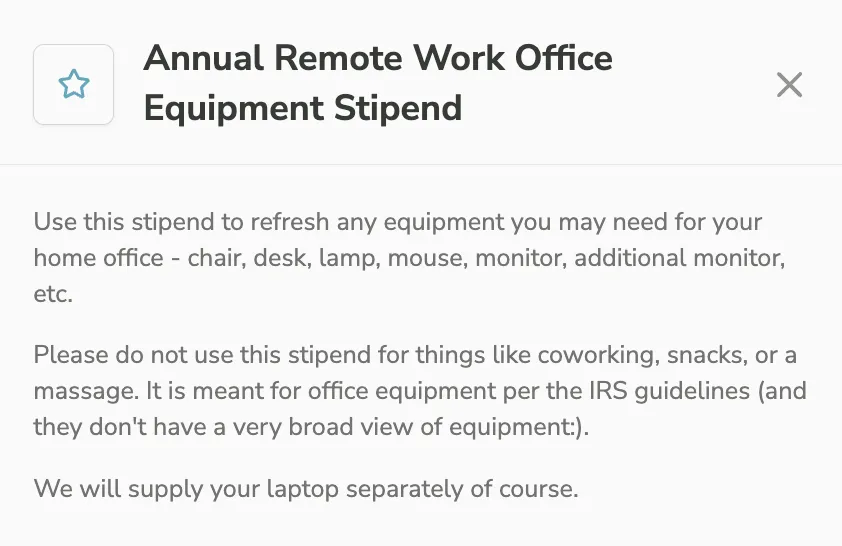
Leave handling. LSA funds can be paused for employees on any type of leave, such as maternity, paternity, or short-term disability leave, then automatically reactivated when they return.
Invitation and reminder emails. You can customize the welcome email copy and the text of reminder emails. Compt manages the timing, cadence, and delivery, and this is a direct contributor to the 94% employee participation rate Compt customers see on average, per the 2026 Annual Lifestyle Benefits Benchmark Report.
No prefunding, no benefit cards: Compt reimburses through payroll after employees spend
The reimbursement-first model is one of the biggest operational differences between Compt and card-based platforms.
Compt is a reimbursement platform, not a prefunded one. Employees pay out of pocket, submit a receipt, and get reimbursed via their next paycheck. Employers only pay for what employees actually use, without managing prefunded balances, card inventory, replacement cards, or declined transactions.
For ADP customers, approved reimbursements push directly to an open payroll batch inside ADP. Payroll runs Compt reimbursements the same way they run any other earnings code. For non-integrated payroll systems, Compt generates a pre-formatted, customized CSV — downloading it and uploading it to your payroll provider takes about 30 seconds. For larger or more automated setups, Compt also supports SFTP delivery directly to your payroll provider, so the file lands without anyone having to move it manually.
“We cut our benefits processing time to just 90 minutes.”
— Kevin Sullivan, Former Global Benefits Manager, Quickbase
That’s compared to a process that previously took days of manual calculations. Quickbase now supports 96% employee engagement across 600+ employees in 46 states and multiple countries.
See how Compt’s payroll integration works for the full setup details.
After launch, Compt manages HRIS sync, reminders, and real-time employee support
Once you’re live, Compt handles the ongoing mechanics:
- New hires sync automatically from your HRIS and receive invites.
- Terminated employees lose platform access automatically.
- Reminder emails go out on Compt’s schedule, driving consistent utilization throughout the year.
- Compt’s support assistant is available 24/7 to handle employee questions, the most common at launch being “What can I use my LSA on?” and “When will I get reimbursed?” If the assistant can’t resolve something, it escalates directly to Compt’s support team.
The ongoing admin work is primarily approving receipts and running payroll. One note on receipt review: Compt uses the term “pre-approval” rather than “auto-approval” for a reason — even when low-dollar taxable expenses are routed into a pre-approved bucket automatically, admins can still go back and reject an expense at any time. It’s not a black box.
Compt’s average first response time for support tickets is 34 minutes, and less than 5% of employees ever need to contact support at all.
Compt’s CX team also stays close to the things that fall outside the standard flow. The goal is not to hand you a login and leave you to interpret the edge cases alone. That matters because a successful launch is not just “the platform is live.” It’s employees understanding what they can use, when they can use it, and how to get reimbursed without turning HR into the help desk.
Compt handles security and access automatically, including when employees leave
Enterprise HR and IT teams routinely ask about security and access controls before signing — not as an afterthought, but as part of evaluating whether the platform can securely handle sensitive employee data and keep it clean when someone leaves.
Compt is SOC 2 Type II and ISO 27001 certified, and GDPR-compliant. Role-based access controls let payroll processors run reimbursements without access to companywide settings. Admins can be scoped to specific programs. Terminated employees lose access as soon as their offboarding syncs from your HRIS — or immediately, if you deactivate them in your SSO provider — with no manual deprovisioning required.
The actual stipend software implementation experience, from Compt customers like Carrot Fertility and Jellyvision
Across very different companies, the pattern is similar: once their Compt program is live, employees do not need a full training program to understand what to do. They log in, see what they’re eligible for, submit their receipts, and move on.
Jellyvision went live in 15–17 days with 200+ employees across more than 15 states. Their Sr. Benefits & Compensation Manager describes what happened after:
There are new hires who join Jellyvision and … it’s intuitive enough that I don’t need to have a separate demo call scheduled.”
— Stephanie French, Sr. Benefits & Compensation Manager, Jellyvision
TEN7, a small, fully remote team, replaced PEX cards and spreadsheets with Compt and launched within days. Their Director of Operations now spends 5–10 minutes twice a month reviewing reimbursements.
“We wanted one place to manage everything — not cards for one stipend, spreadsheets for another, and company credit cards for the rest.”
— Dani Adelman, Director of Operations, TEN7
Carrot Fertility launched in two weeks with 300+ remote employees across 40 states, then hit 97% platform engagement and 92% LSA utilization.
“I don’t want my employees to struggle with using a benefit, whatever it is. It needed to be seamless for us and the employee.”
— Leslie Neitzel, Chief Human Resources Officer, Carrot
Fictiv, a 100+ person manufacturing tech company, hit 95% team participation in its first year — including an 89% increase in learning stipend utilization. ButterflyMX, with 200+ employees across 10 countries, reached 96% participation globally with 100% tax compliance.
That’s the real implementation test: not just whether the platform launches, but how easily employees can navigate and use it without HR having to explain it over and over.
Who touches what: the actual time commitment for HR, IT, Finance, and HRIS at Compt customers
| Stakeholder | What they do | When |
|---|---|---|
| HR / People Ops | Program design, category descriptions, communication plan | Weeks 1–4 |
| IT | SSO configuration (Okta, Microsoft Entra, or equivalent) | Week 2–3, one-time |
| Finance / Payroll | Confirms payroll template; creates reimbursement pay code if needed; runs first cycle | Week 2–3 setup; ongoing approval |
| HRIS admin | Confirms API access; validates field mapping | Week 2–3, one-time |
For companies with someone on staff who has used Compt before, the training burden drops to near zero.
“I didn’t have to sell Compt. Compt pretty much sold itself.”
— Kevin Sullivan, Former Global Benefits Manager, Quickbase
Six questions to ask every LSA vendor before you sign
When you’re comparing LSA software implementations, the differences that matter most are operational: how the roster stays current, how reimbursements reach payroll, and what your team actually has to own every month. Before signing with any vendor, get specific answers to these:
- How does employee sync work? API or manual roster? If manual, who manages it?
- When do new hires get access? Is there a lag, and is it configurable?
- Is this prefunded or reimbursement-based? What happens to unused funds?
- How do reimbursements reach payroll? What does Finance have to do each cycle?
- How do employees log in? Is SSO supported and included?
- What happens when someone is terminated? Is access removed automatically?
The important thing is not whether a vendor says implementation is “easy.” It’s whether they can show you exactly how all these pieces work before you sign.
Ready to get started? Request a Compt demo to walk through your implementation timeline, system setup, and team responsibilities.
FAQs: LSA and stipend software implementation with Compt
Compt is designed so that the platform-side work — HRIS integration, stipend configuration, SSO, payroll setup — is handled almost entirely by Compt’s Customer Success team, not your HR or IT staff. Most customers spend a few hours on decisions (e.g., program design, category descriptions, payroll codes) and a couple of one-time touchpoints for IT and Finance. The actual stipend software implementation takes about a week on Compt’s end once you have all the inputs ready. Jellyvision launched Compt to 200+ employees across 15+ states in 15–17 days. TEN7 launched a 10-person team in days. Carrot Fertility was live in two weeks.
“Compt has been instrumental for us to be able to increase employee satisfaction and utilization rates far higher than we could have ever achieved with our old perks approach,” says Melissa Salcius, Director of People Operations at Fictiv.
What are the best LSA platforms for fast onboarding and quick employee enrollment?
Compt is built for fast LSA software implementation without requiring card provisioning, prefunding, or IT-heavy setup. Employees enroll automatically as they’re added to your HRIS, helping you avoid manual roster management or a separate onboarding flow. Once auto-invitations are enabled, new hires get their invitation as part of the HRIS sync cycle, which runs daily by default.
The employee-facing experience is simple and receipt-based: employees make a purchase within an eligible stipend category, upload a receipt in the app, and get reimbursed via payroll. There are no cards to issue and manage, and no separate portals to configure.
I need a Lifestyle Spending Account platform with SSO, fast implementation, and automatic new-hire access. What are the best options?
Compt has all three of these features. SSO is supported via Okta, Microsoft Entra, Google, and other common identity providers — it’s a one-time IT configuration with no ongoing management. Automatic new-hire access is handled by the HRIS sync: once a new hire appears in ADP, Rippling, or your connected system, they’re added to Compt automatically and invited without any manual step. And for LSA implementation speed, most customers are live within two to four weeks of contract signature, with Compt doing the platform build and your team confirming details at key decision points.
Which LSA platforms auto-provision and deprovision employees based on HRIS data?
Compt will automatically auto-provision and deprovision employees based on HRIS data. Auto-provisioning works through the daily HRIS sync: new hires added to your connected system (ADP, Rippling, and others) appear in Compt by the next sync cycle and receive their LSA invitation automatically once you’ve enabled auto-invitations post-launch. Deprovisioning is equally automatic — terminated employees are removed from Compt as soon as the offboarding syncs from your HRIS, or immediately if you deactivate them in your SSO provider, with no manual work for admins. Deactivated users also don’t repopulate from future syncs, which is a useful failsafe if a user is added in error.
What’s the best LSA software with daily HRIS sync and automatic new hire enrollment?
Compt syncs daily by default, with hourly sync available for any integration if needed, and a manual re-sync option available anytime from the admin panel. New hire enrollment happens automatically once auto-invitations are turned on after launch — there’s no manual outreach needed. Eligibility rules (hire date buffers, first-of-month enrollment, tenure-based access, department or location tiers) are all configurable and pull directly from your HRIS fields. The daily sync cadence, combined with configurable enrollment rules, is how Compt customers consistently achieve a 94% average employee participation rate, per the 2026 Annual Lifestyle Benefits Benchmark Report.
I need employee benefits software that supports out-of-pocket purchases first and quick reimbursement. What should I use?
Compt’s entire LSA model is built on the reimbursement-first approach: employees pay out of pocket, submit a receipt through the app or web, and get reimbursed via their next regular paycheck. There’s no prefunded account to manage, no benefit card to provision or troubleshoot, and no float sitting idle in a vendor account. Reimbursements route through your existing payroll system — pushed directly to ADP for ADP customers, or via a formatted CSV for other payroll providers. This reimbursement-first model also means you only pay for what employees actually use.
Editor’s note: Compt software supports the categorization and proper reporting of benefits according to IRS guidelines, helping businesses maintain compliance. However, Compt cannot provide tax advice, and users should consult their own tax, legal, and accounting advisors when necessary.