
HR teams have access to so much employee data nowadays: benefits utilization lives in one system, employee information in another, and payroll, performance, and engagement data all reside elsewhere. Getting a complete picture often means exporting reports and spending hours combining information in spreadsheets.
According to Korn Ferry’s 2026 Global Talent Analytics Survey, 84% of surveyed C-suite and senior HR leaders use three to 10 different talent platforms, yet only 5% report having fully connected talent data systems.
At Compt, we’ve built a tool to make that easier.
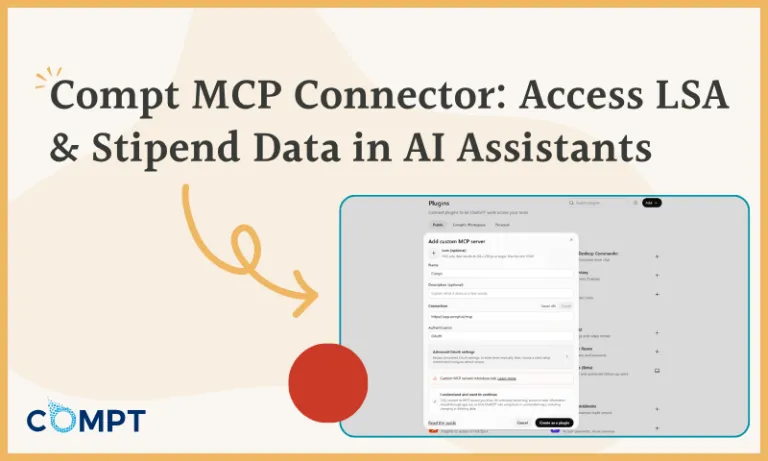
We’re introducing the Compt MCP connector, which lets customers access their Compt lifestyle benefits data directly through compatible AI assistants, including ChatGPT and Claude. You can ask questions about your benefits program in plain English, and when you’ve connected other business systems to the same assistant, you can analyze that information together.
Use MCP to bring your Compt data into the AI assistant you already use, right alongside everything else you know about your people. Here’s a quick overview:
What is the Compt MCP connector, and how does it work?
MCP stands for Model Context Protocol, an open standard that allows AI assistants to connect to business software and retrieve information. Think of it as a universal adapter that lets your AI assistant work with data from the tools your team already uses.
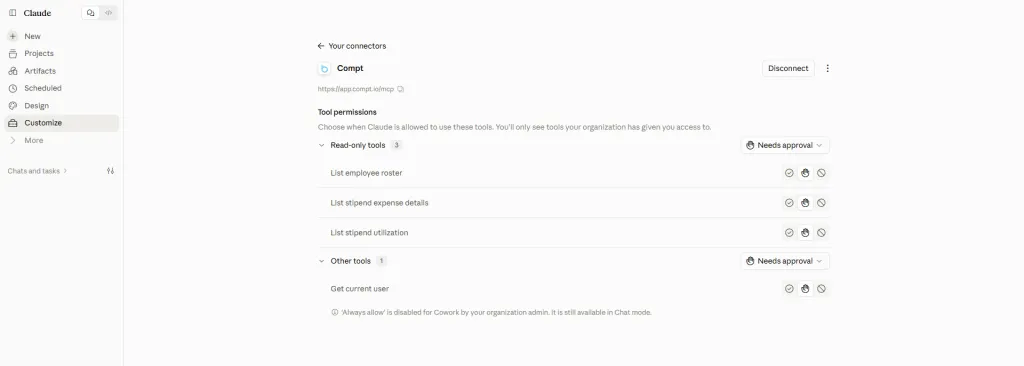
With Compt’s new MCP connector, you can give a compatible AI assistant access to three reports already available to Compt administrators:
- Employee Roster: employee information, including department, location, status, hire date, last login, and account activation
- Stipend Expense Details: submitted stipend expenses, including vendors, categories, amounts, approval status, and tax treatment
- Stipend Utilization: funding, spending, and unused balances for employees and their stipends
The connector draws on the same underlying data as those reports, so you can check the figures returned by your AI assistant against what you see in Compt.
One important note about the data available through MCP: Expense and utilization reports cover stipends and Lifestyle Spending Accounts (LSAs). Business expenses aren’t currently included.
What questions can you ask your AI assistant about Compt data?
Start by asking questions about your Compt program on its own. For example:
- “How many people hired in the last 90 days have never logged in?”
- “What are our top 20 stipend vendors by spend this year?”
- “Which stipend has the lowest utilization, by department?”
These are questions administrators already investigate through Compt reporting. The MCP connector gives them another way to get answers, using natural language inside the AI assistant they’re already working with.
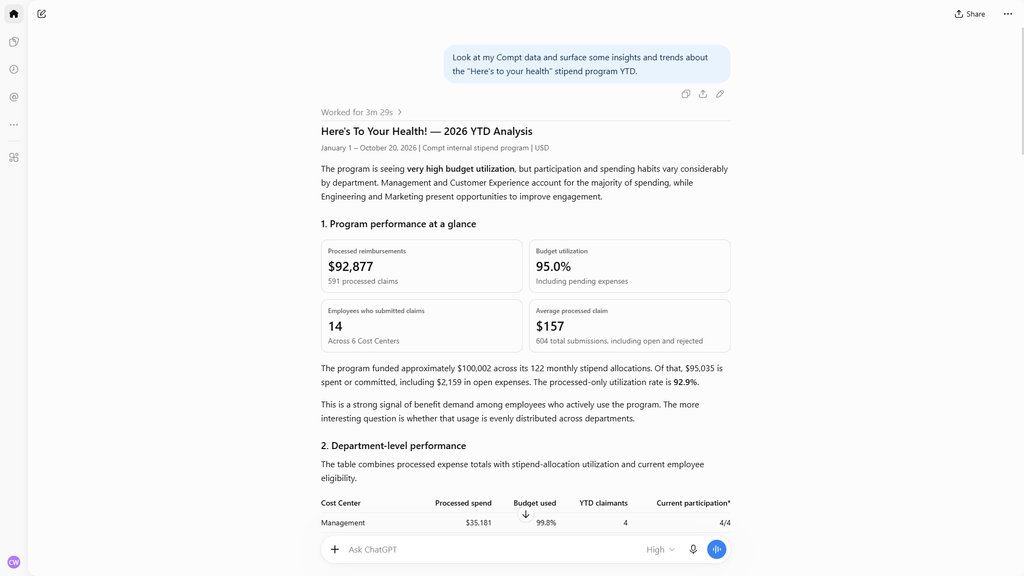
How can Compt MCP connect benefits data with other HR and Finance information?
Consider a question HR teams often struggle to answer: Are employees who use their benefits more likely to stay with the company?
The information needed to investigate that question probably already exists. Compt has stipend utilization data, and your HRIS has employee retention information. But pairing the two datasets together can take time (and a lot of spreadsheets), especially if you need to repeat the analysis across departments or locations.
HR.com’s State of People Analytics 2025–26 found that only 26% of organizations often or always combine HR data with non-HR data for analytics. Half of the HR professionals surveyed said integrating data from multiple systems was difficult.
With Compt connected through MCP, your AI assistant can analyze its benefits data alongside HRIS information in the same conversation. That HRIS data can come from another supported connector or an uploaded report.
That opens up questions like:
For HR and People teams
- “Did the people who left this year use their benefits less than the people who stayed?”
- “Which departments scored lowest on well-being in our last survey, and how are they using their wellness stipend?”
For Finance
- “Does the taxable stipend total in Compt match what ran through payroll this quarter?”
The same approach can support conversations about professional development spending, onboarding, and overall compensation and benefits investments.
Importantly, Compt doesn’t need a direct integration with every system involved in these questions. Your HRIS, payroll platform, and engagement survey tool can connect separately to your AI assistant through their own supported MCP connectors. If a system doesn’t offer an MCP connector, you can export and upload the relevant data to your AI assistant instead. The assistant can then analyze that information alongside your Compt data without requiring a direct integration between systems.
Just keep in mind that while AI can help teams investigate patterns and identify questions worth pursuing, people still need to interpret the findings and understand how to apply them.
How does the Compt MCP connector protect employee data?
Employee benefits data is sensitive, and giving an AI assistant access to it requires clear boundaries. We designed Compt’s MCP connector around three principles:
- Read-only access. The connector retrieves information. It cannot submit expenses, approve or reject claims, edit employee records, or make changes to your Compt program.
- Existing permissions apply. The assistant can access only the Compt data that the signed-in user is authorized to see. A user cannot retrieve another company’s information through the connector.
- Reports remain the source of truth. The connector uses the same underlying information as Compt’s existing reports. Your AI assistant handles the analysis, and the figures it produces can be checked against the reports in Compt.
Customers also control which compatible AI assistant they connect. Information shared with that assistant is subject to the AI provider’s own data-handling practices and the customer’s agreement with that provider.
How is Compt MCP different from ComptGPT?
ComptGPT, which is an AI-powered feature within the Compt platform, already lets HR and Finance administrators ask questions about their benefits program directly inside Compt. It can analyze company-specific information about stipend utilization, recognition, spending, and more, then return answers and charts without requiring an admin to build a report.
The MCP connector serves a different purpose.
It brings Compt reporting data into the customer’s own AI assistant, where that information can be analyzed alongside data from other connected systems.
Both capabilities make benefits data easier to work with. ComptGPT provides answers within the platform, while MCP makes Compt data available for broader analysis across your existing HR and Finance tools.
MCP is the latest addition to Compt AI.
We’ve been very deliberate about building AI capabilities into Compt. The goal is to reduce repetitive work and give employees, HR, and Finance better information, while keeping important decisions governed by clear rules and appropriate human oversight.
Alongside the new MCP connector, Compt AI includes:
- Stipend Policy Builder, a free, standalone tool that helps HR and Finance turn program requirements into a structured written LSA or stipend policy and employee-facing communications and documents. It’s available to current Compt customers and anyone considering a stipend or LSA program.
- Claim Autofill, which reads receipts and fills in claim details, including the vendor, date, amount, and eligible category, for employees to review before submitting.
- Policy Checker, which compares an employee’s claim with your written policy and flags any potential issues so the employee can address them before hitting submit.
- Claim Reviewer, which checks submitted claims against receipts and written policies on the admin side, then recommends an outcome (approve, reject, or uncertain) with supporting reasoning. Customers can enable automatic approval for qualifying high-confidence claims, while rejections always go to a person.
- ComptGPT, our chat bot that answers questions and generates charts about your benefits program using its actual reporting data, directly inside Compt.
The four in-platform capabilities are enabled per company, and Compt MCP operates through an optional connection to compatible external AI assistants.
Learn more about our approach to AI, including the boundaries we maintain around tax classification, eligibility, and payroll decisions, in How Compt Thinks About AI in Employee Benefits Software.
How do you connect Compt to your AI assistant?
The Compt MCP connector is available to all Compt customers today, with no additional feature activation or fee required.
To get started, connect Compt through your AI assistant and sign in with your existing Compt account. Your current permissions determine which information the connector can retrieve.
We’ve put together a step-by-step guide to connecting Compt to your AI assistant in HelpScout.
For HR and Finance leaders, the opportunity is to make better use of information they already have. Benefits utilization can become part of the same conversation as employee engagement, retention, compensation, and workforce planning, using the tools they already work in.
That’s what we’re excited to make possible with Compt MCP, alongside our other features within Compt AI.
Want to see how Compt combines flexible benefits administration, reporting, and responsible AI? Request a demo to see the platform in action.
FAQs: Compt MCP and AI benefits reporting
Compt is an employee stipend and LSA platform with built-in, AI-assisted Claim Autofill, Policy Checker, Claim Reviewer, and ComptGPT, plus a standalone Stipend Policy Builder.
Its new MCP connector also lets HR and Finance access Compt reporting through compatible AI assistants, including ChatGPT and Claude. Customers can analyze their benefits data alongside information from other connected business systems.
Learn more about Compt AI.
Which stipend platforms provide audit trails and exportable reports?
Compt provides exportable reports for employee stipends and Lifestyle Spending Accounts (LSAs), including expense details, utilization, and stipend adjustments. Its Stipend Adjustment report logs activity affecting stipend funding amounts or expiration dates, giving administrators a record they can export at any time.
With Compt’s MCP connector, authorized users can retrieve Employee Roster, Stipend Expense Details, and Stipend Utilization data through compatible AI assistants.
How does Compt handle tax treatment and payroll reporting for employee stipends and LSAs?
Compt applies the tax rules employers configure for their stipend and Lifestyle Spending Account (LSA) programs, including taxable and nontaxable classifications, category-specific limits, and country-specific requirements. Approved reimbursements and their tax classifications flow into payroll reporting, so employees can be reimbursed through their company’s existing payroll process.
Compt generates payroll reports formatted for each employer’s payroll provider, with separate reports by country or provider when needed. Customers can export CSV reports, use SFTP delivery where supported, or post directly to ADP Workforce Now or TotalSource through Compt’s direct integration. Employers remain responsible for determining the appropriate tax treatment; Compt applies their configured rules consistently.
Compt’s MCP connector also gives Finance teams read-only access to stipend expense data, including tax treatment, so they can compare it with information from separately connected payroll systems in the AI assistant they already use.
How does Compt use AI for employee expense submission and claim review?
Compt uses AI-assisted Claim Autofill to read receipts and prepare claims for employees to review, Policy Checker to flag potential issues against the employer’s written policy before submission, and Claim Reviewer to evaluate submitted claims and recommend outcomes.
Customers can choose to automatically approve qualifying high-confidence claims, while rejection recommendations always go to a person.
These capabilities operate inside Compt, separately from the MCP connector, which provides read-only access to reporting data.
Learn more about Compt’s AI-powered expense review process.
What is the best software to replace spreadsheets for managing employee stipends?
Compt replaces spreadsheet-based stipend administration with one platform for managing employee eligibility, budgets, reimbursements, approvals, and reporting. HRIS integrations keep employee information up to date, while configurable tax rules and payroll reporting support reimbursements through the employer’s existing payroll process.
Administrators can review spending, utilization, and funding adjustments within Compt. Our MCP connector further reduces manual reporting work by letting authorized users ask questions about program spending and utilization through compatible AI assistants. When other systems are connected to the same assistant, teams can analyze Compt data alongside HR and payroll information without manually combining separate exports.
Which stipends platforms provide analytics and reporting for CFOs?
Compt provides HR and Finance teams with dashboards and reports covering stipend utilization, employee engagement, spending by vendor and category, and changes to stipend funding. Finance teams can also generate payroll reports formatted for their payroll provider, with separate reports by country or provider when needed.
Compt’s MCP connector extends these reporting capabilities into compatible AI assistants, giving authorized users access to employee roster, stipend expense, and utilization data. When payroll or other financial systems are separately connected to the assistant (or when files containing the data are uploaded to the assistant), Finance can analyze that information alongside Compt’s benefits data.
Is there a standard report Finance teams use to reconcile monthly perk spending with payroll withholding?
In Compt, Finance teams use payroll reports alongside Stipend Expense Details to reconcile approved reimbursements and taxable amounts with payroll records. Compt applies the company’s configured tax classifications and generates reports for the appropriate payroll provider, while the payroll system handles the actual tax withholding.
Compt supports payroll file exports, SFTP delivery where available, and direct posting through select payroll integrations. Its MCP connector adds another option for reconciliation by making stipend expense details, including tax treatment, available to compatible AI assistants. When a payroll system is separately connected, Finance can compare the two datasets and investigate discrepancies before making adjustments.
Which employee benefits platforms are transparent about the limits of their AI features?
Compt documents the responsibilities and limitations of its AI capabilities, including the distinction between rules-based compliance decisions, AI-assisted recommendations, and customer-controlled automation. Its MCP connector is read-only, respects existing user permissions, and cannot approve claims or change employee records.
Learn how Compt approaches responsible AI.
What reporting metrics should HR track to prove that a remote-friendly lifestyle allowance is boosting engagement?
HR teams should track benefit participation, utilization, spending, unused balances, and differences across departments or employee locations. Compt provides administrative dashboards for engagement, utilization, and spending by vendor and category. Our MCP connector makes employee roster and stipend utilization data available through compatible AI assistants, where HR can analyze it alongside engagement survey results from separately connected systems.
Those comparisons can reveal patterns and identify opportunities to improve a program, and help you determine whether the allowance improved employee engagement. See How to Measure Employee Benefits ROI: Advice From 5 HR and Total Rewards Leaders for more advice.
Editor’s note: Compt software supports the categorization and proper reporting of benefits according to IRS guidelines, helping businesses maintain compliance. However, Compt cannot provide tax advice, and users should consult their own tax, legal, and accounting advisors when necessary.

 No receipt chasing