
Professional development is high on employees’ priority lists in 2025.
Nearly 90% of Millennials (who make up 35% of today’s workforce) say professional development opportunities are ‘very important to them’ when evaluating different roles. And according to LinkedIn’s 2025 Workplace Learning Report, 88% of organizations are worried about employee retention.
Study participants’ #1 retention strategy? Providing learning opportunities.
Data from our annual Lifestyle Benefits Benchmark Report confirms the trend. 1 in 5 Compt users is now using our platform to offer a professional development stipend, and the average annual funding is $1,140 per employee.
Still, just 17% of employees ‘strongly agree’ their current employer is actively investing in the skills they need to advance their careers.
There’s an easy solution for that: Launching a professional development program. The continued focus on professional development is what led us to create a product specifically designed to help make professional development management easy and scalable.
To build Professional Development Pro™ by Compt, my team and I had to sit down and think: What goes into launching a professional development program, anyway?
After talking to tons of program administrators we discovered, well, a lot.
Professional development programs are a great solution to show your employees you care about their future and tackle emerging retention issues. But, before you tack yours onto your list of employee perks and send out a company-wide memo, you have to cover a few bases:
- How you’ll align the program with your budget and business goals
- The specific tactics you’ll use when implementing it
- How you’ll manage the financial aspects, like employee reimbursement and taxes
- How to make it a long-term success
Within these broader considerations, there are 11 critical questions you and your team will need to ask yourselves before launching a professional development program. We like to think of these questions in a set of three: Your Mission Alignment, Administration, and how to Prove Success.
Difficult to remember? For your own path to professional development success, chart the course with your own set of MAAPS. Yes, we thought of that all on our own! Here’s a closer look at the MAAPS framework:
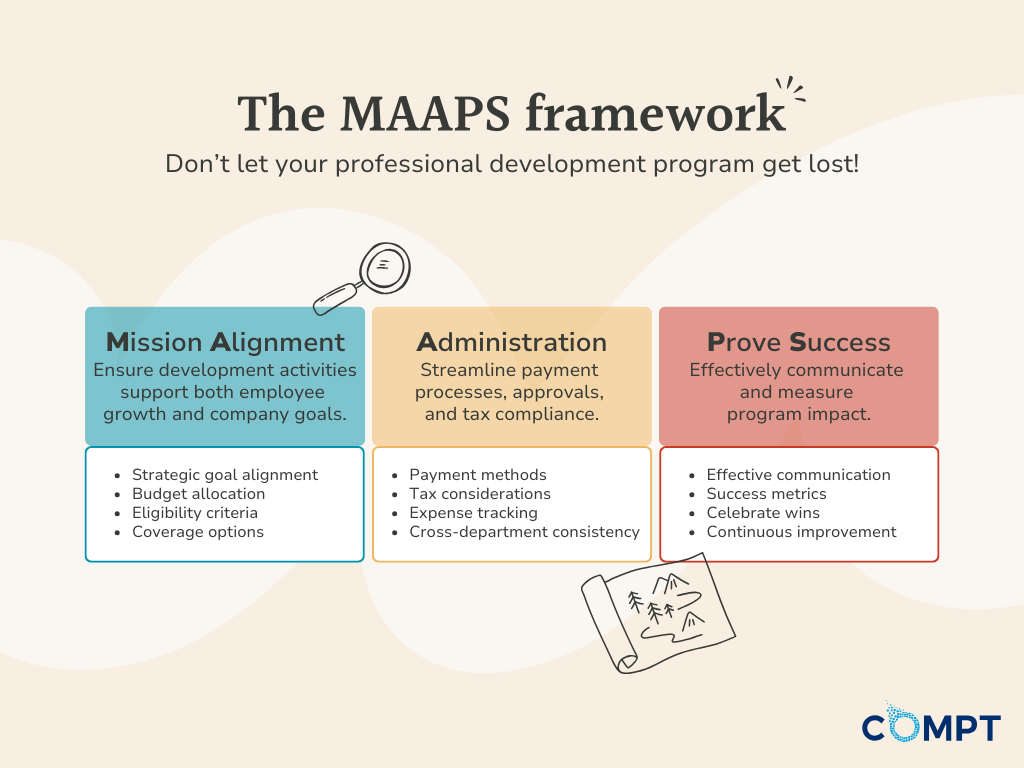
Mission Alignment: Aligning your program with budget and business goals
Before you even start to design your program, you have to know the basics: how much you can spend and how professional development will fit into your broader company goals. Here are the questions that fit into this category:
1. How can we make sure employees drive career growth in ways that align with the company’s strategic goals?
When it comes to ANY kind of employee benefit, we’re big proponents of inclusivity through flexibility. You want employees to feel empowered to grow in ways that matter to them. That said, offering a stipend is a strategic initiative — you want to be sure their growth is actually fueling your company’s success.
Before assigning a dollar amount, it’s time to get super clear on the strategic link between employee development and your business goals.
Ask yourself:
- What are our biggest business priorities? (e.g., digital transformation, leadership development, customer experience, operational efficiency)
- What skills and knowledge gaps exist within our teams?
- What future roles will we need to fill internally?
Once you define these, you can map employee career growth to the company’s needs, not by dictating choices but by curating options that serve both their individual and your business goals.
You can also allow for self-proposed learning paths. Rather than make it a free-for-all, employees can request funding for development through a quick and simple justification process (how will this course, conference, or certification help them in their current or future role?).
2. How much can we allocate per employee for professional development?
There’s no universal ‘right’ amount, but Compt users typically allocate anywhere from $100 to $2,000 per employee per year for professional development. It all depends on your industry, how big your company is, and how much you can realistically afford to put into it.
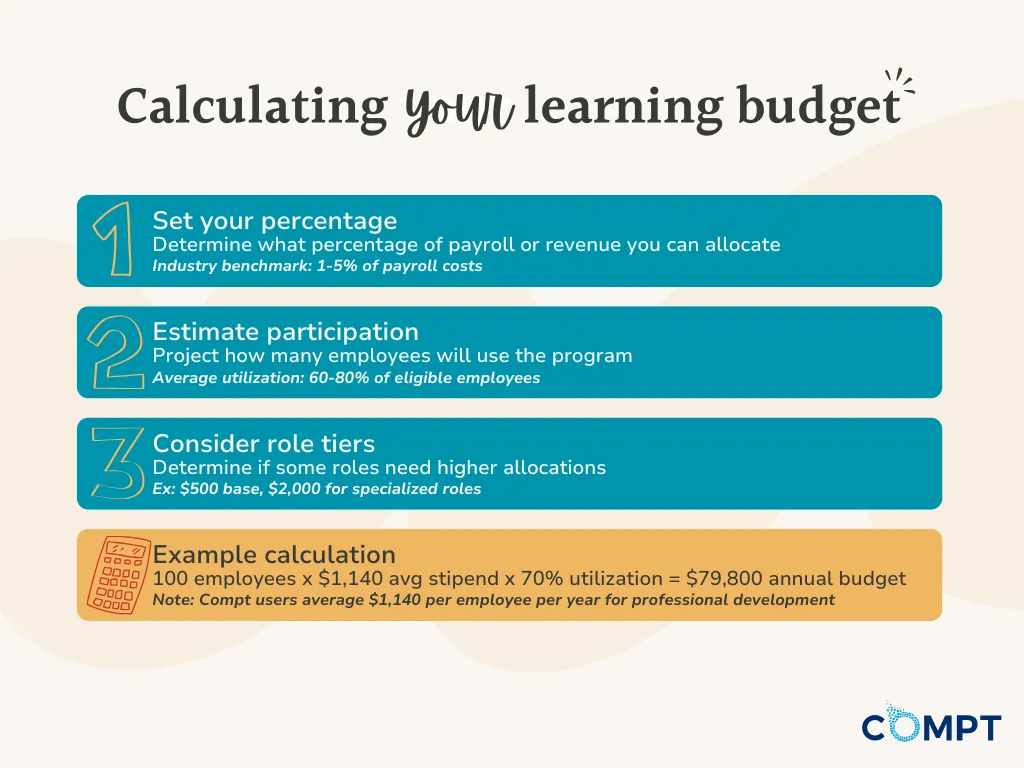
To calculate a sustainable number:
- Determine your total L&D budget. What percentage of revenue or payroll can you comfortably allocate without straining operations? A common benchmark is 1-5% of payroll costs.
- Estimate participation rates. Not every employee will use the full budget. If only 60% of employees take advantage of training, you can afford to offer more per person. You can get an idea for engagement rates by sending out an interest survey or looking at past participation in professional development programs.
- Consider tiered allocations. High-impact roles (e.g., managers, tech specialists) might receive larger budgets than entry-level employees.
Keep in mind you don’t have to get it perfect from the start. Pilot the program for a year, track utilization, and collect feedback. If most employees aren’t using the budget, find out why — maybe they don’t know about it, or the options aren’t relevant.
Or, if demand is high, you might justify increasing the allocation in the next year.
3. Who will qualify for the stipend, and why?
There are a few approaches to structuring eligibility when launching a professional development program:
- ‘All employees are eligible‘ (best for engagement and companywide learning culture, but requires a higher budget)
- Eligibility based on tenure — e.g., ’employees become eligible after 6 or 12 months.’ (best for retention and ROI control)
- Eligibility based on role or function (best for business-aligned development, but requires alternative low-cost development opportunities for those who don’t qualify)
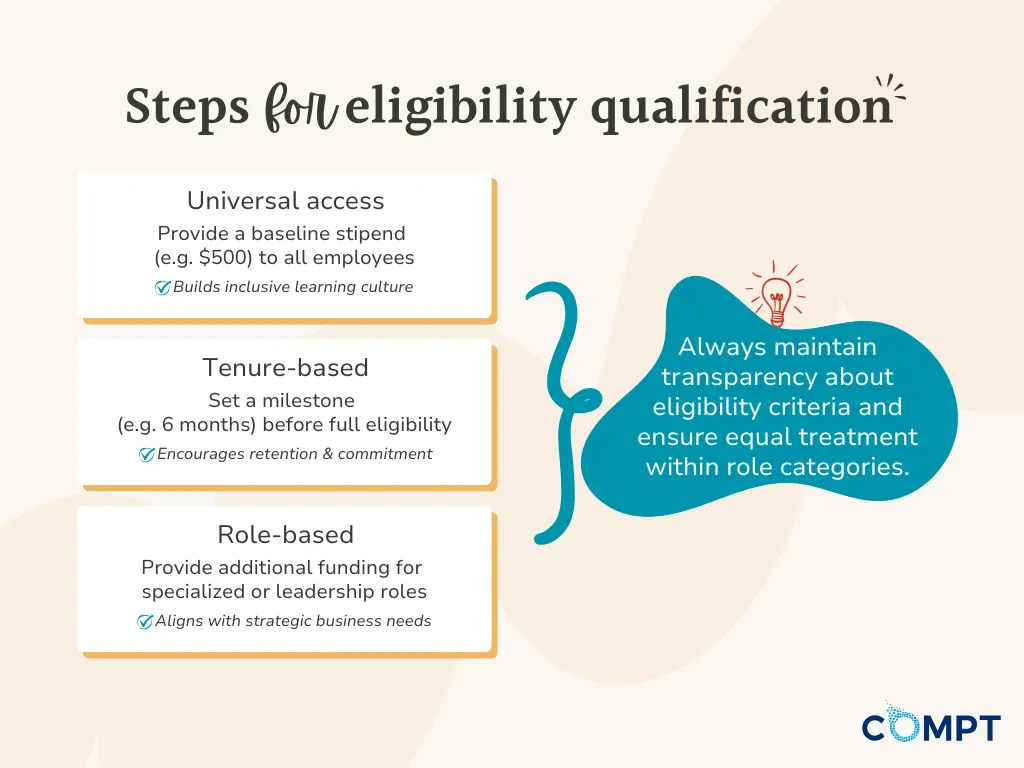
Ideally, you’ll take a hybrid approach to balance inclusion and strategy, like this:
- All employees get a baseline stipend, say, $500 to use annually.
- New hires become eligible after 6 months or a performance review milestone.
- Key roles or leadership tracks get additional funding for specialized certifications, conferences, or degree programs.
Make sure you’re transparent about the selection criteria. If leadership roles get more funding, frame it as an opportunity, not a restriction — if employees grow into a higher-impact role, they’ll become eligible for more resources.
And whatever you do, make sure each employee in the same role gets the same stipend to avoid bias or discrimination.
4. Which professional development activities or resources will the stipend cover?
What you cover with your stipend will depend on your business goals, the skills gaps you’ve identified, and the allocation you’ve arrived at in Questions 1 and 2.
From a strategic standpoint, we can break professional development activities and resources into two categories, based on those findings: (1) broad coverage for hiring and retention and (2) focused learning for a competitive edge.
If you go the broad coverage route, you’ll offer a flexible stipend for things like:
- Courses and professional certifications (LinkedIn Learning, Coursera, Udemy, university courses)
- Conferences and industry events (travel included)
- Books and educational materials (physical books, eBooks, subscriptions to Harvard Business Review, etc.)
- Coaching and mentorship programs (executive coaching, leadership development)
- Tuition reimbursement (for degrees directly tied to their role or a future role within the company)
We know that professional development can vary by employee, so it’s important to find a program that can cover more than one ‘type’ of professional development. You can take a look at the broad number of categories we found among our own Compt customer base from the data in our 2025 Lifestyle Benefits Benchmark Report:

With Professional Development Pro by Compt, we’ve also included a Recommendations feed so employees can see what others are doing with their funds and get ideas on how best to spend their professional development budget. They can even see peers outside of their company, which is incredibly useful for smaller teams that may not have a comparable role throughout the company.
But the current state of learning and development also demands focus on specialized skills, like AI and automation. In this case, you may opt for a focused stipend that covers something targeted, like:
- AI and automation training (e.g., OpenAI courses, Google AI certifications)
- Advanced coding and data science programs
- Industry-specific technical certifications
- Workshops or bootcamps on AI-driven business strategies
Keep in mind that with a stipend, you can include both types of resources.
If your goal is company-wide engagement, broad coverage works best. If it’s business growth and specialization, promote using it in areas where the company needs to gain a competitive edge.
5. Will employees need pre-approval for expenses?
Approval processes can either encourage or completely kill participation when launching a professional development program. You want a system that ensures company dollars are spent wisely but doesn’t create unnecessary friction for employees or managers.
A tiered approach can help you maintain flexibility while keeping spending in check:
- No pre-approval required for smaller expenses (e.g., books, online courses under $500). Employees submit receipts and get reimbursed.
- Pre-approval required for larger expenses (e.g., certifications, conferences over $1,000, degree programs).
That way, low-cost items don’t cause too much friction, but bigger investments get the oversight they need.
This is where a platform like Compt can help. With Professional Development Pro by Compt, you can:
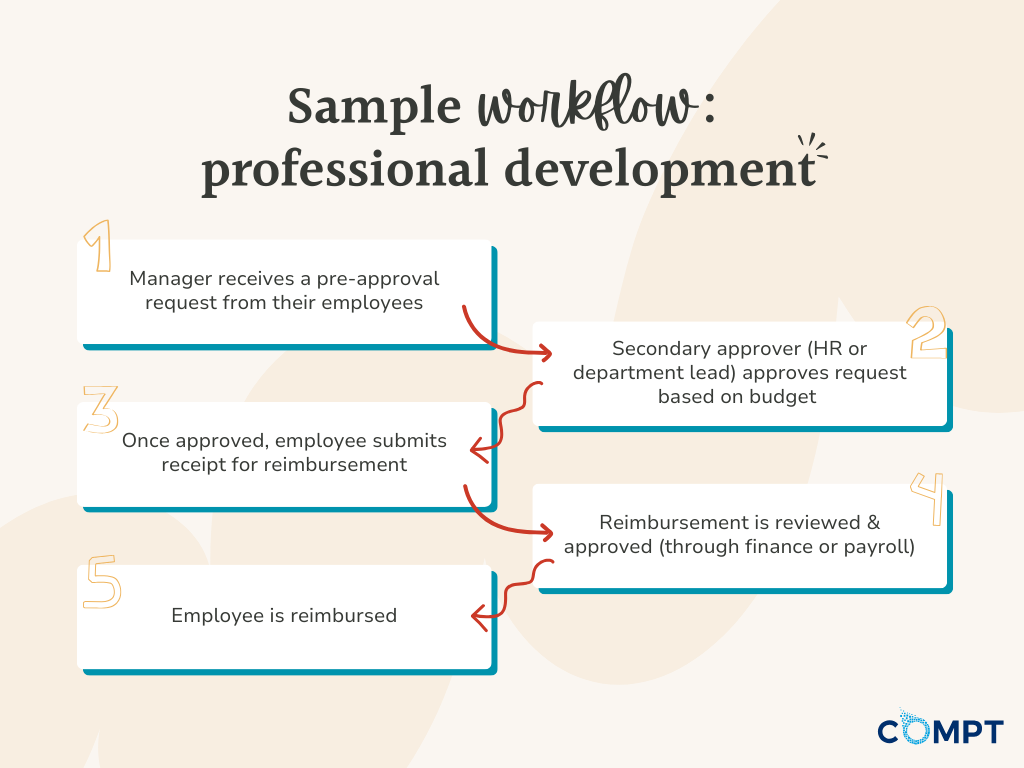
- Centralize requests, approvals, reimbursements, audit logs, budgets, and communications.
- Set up custom program guidelines to let employees know what will be automatically approved.
- Customize request forms for both pre-approval and reimbursement.
- Directly integrate with your HRIS for manager approval routing.
- Track spending patterns to refine the program over time.
With Compt, you can also customize approval flows. That means you can add in a primary and secondary approver for each stipend or reimbursement, like this:
6. How can we ensure consistency across departments and teams?
This is a big one because flexibility is great until it leads to inconsistency and frustration. Professional development isn’t supposed to feel like a lottery where it depends on who your manager is.
To ensure consistency, you need to create clear company-wide guidelines for what is and isn’t covered.
- Establish a universal eligibility framework. Every employee should know what’s automatically approved and what needs additional review (no manager discretion required).
- Create pre-approved categories, vendors, and claim amounts Thinking through pre-approvals can save a lot of hassle for HR leaders and their management team. For example, you could make a specific learning vendor that you want everyone to have access to pre-approved, and/or you could pre-approve claim amounts under $50, to automatically approve small claims like professional development books.
- Make the stipend equitable across teams. Whoever controls the professional development budget needs to understand there is likely to be nuance across the employee base (for example, an engineering team may have larger budgets to allocate for upskilling needs, or one team’s presence may vary in size by location), so this should be considered when defining budgets.
If one team’s manager is stricter than another’s, employees should have a way to escalate concerns (e.g., an HR review process). And some managers deny requests out of habit or misunderstanding.
That’s why we recommend training managers on your learning or development program and placing the guidelines somewhere easily accessible, like your company intranet.
Psst: Ready to launch? We’re here to help.
Administration: Determine how you’ll pay out professional development stipends
When you offer a learning and development stipend or professional development account, you’re going to need to decide how (and when) you’ll disburse it to your team. You’re also going to need to set up tracking and reporting. And there are unique tax implications, depending on what kinds of expenses you’re covering. Here are some questions to consider in this phase of launching a professional development program:
7. Will we pay the stipend upfront, or have employees submit expenses for reimbursement?
Who is responsible for program funds? Is it employer-paid or does the employee pay and then get reimbursed?
Upfront payments eliminate financial barriers for people who don’t have the means to pay upfront, and they make personalization easy. But they tie up company funds before the benefit is actually used. And you might end up paying for unused benefits or those which aren’t used effectively.
Reimbursements ensure company funds are only spent on actual, verified expenses, and reduce upfront cash flow. And since they go through approval, they encourage employees to be selective and intentional about their development choices.
Compt uses a stipend reimbursement model that combines the advantages of both prepayment and reimbursement systems:
- Employees can select vendors and services that best meet their professional development needs, thanks to the ‘stipend’ aspect of our system.
- You only reimburse funds that are actually used, thanks to the ‘reimbursement’ aspect.
So, everything’s flexible and personalized, but you also have more control over your cash flow.
8. How will we handle taxable and non-taxable expenses?
In general, fringe benefits (like stipends) are taxable income. But there are several exceptions, ESPECIALLY when it comes to professional development.
There are three buckets professional development expenses fall into:
- Tax-free educational assistance (up to $5,250 per employee per year, through 2025 — IRS Section 127)
- Non-taxable business expenses (work-related training and development — IRS Section 132)
- Taxable perks (anything that doesn’t fit in #1 or #2)
If you use a benefits software to launch your professional development program, it’ll be able to tell you which of your covered expenses fall into each category so you can handle tax reporting correctly. And by integrating it with your accounting/payroll software, it can adjust an employee’s W-2 earnings to reflect the additional income whenever they use their stipend on a taxable expense.
9. How will we track usage, expenses, and the impact of the stipend?
Your professional development stipend is an investment, not just a perk, so you need to make sure employees are actually using it, track how people spend their funds, and measure whether it’s making a real business impact.
Here’s what you should track:
- Participation rate: What % of employees are using the stipend?
- Utilization rate: How much of the allocated budget is actually being used?
- Spending categories: Are employees choosing online courses, conferences, certifications, books, all of the above?
You can use a stipend management software to auto-track spending by category, integrate reimbursements directly into payroll, and classify taxable vs. non-taxable expenses upfront. You may also want to look into what teams are using the stipend and on what to understand where upskilling gaps may be happening.
We recommend setting expense reporting rules internally. For example: Set a timeframe (e.g., 30 days) in which employees have to submit receipts. Have managers or HR review high-ticket requests ($1,000+). And then, minimize admin work by creating pre-approved learning categories or even vendors.
Prove Success: How will you make your program a hit?
You can get everything right up to here and still flop if your employees don’t know about your program, don’t use it, or don’t feel they can benefit from it. That’s where communication and effective measurement come in.
10. How will we communicate the stipend program to employees?
Communication is everything when rolling out any kind of benefits program, especially if you have a remote team. If employees don’t fully understand what’s covered, how to use it, and why it matters, participation will be low, and the benefit will go to waste.
When launching a professional development program, your announcement should be loud and visible.
- Host a kickoff meeting (Zoom, Slack Huddle, or in-person town hall) to introduce the stipend.
- Follow up with a detailed email & Slack message summarizing everything.
- Create a one-pager Stipend Guide in your employee handbook or knowledge base (Notion, Confluence, Google Docs, etc.), complete with suggestions for how to use it.
- Invite everyone to onboard themselves, and set automated reminders for those who haven’t after X number of days.
To drive ongoing engagement, use Slack, emails, or all-hands meetings to showcase employees who have used their stipend well — e.g., “Sarah in marketing used her stipend for an SEO certification and got promoted. Here’s her experience!”
Psst: For real ways that we’re using our professional development stipends at Compt, check out our latest blog.
11. What metrics will we use to evaluate the program’s success?
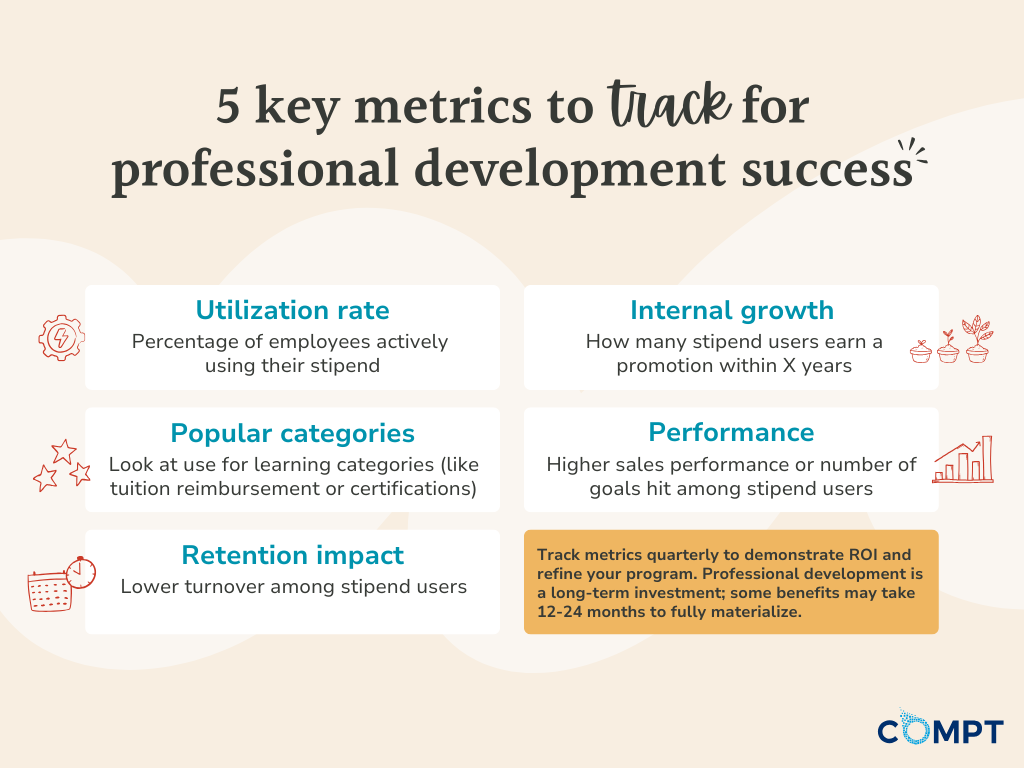
There are several important metrics you can use to assess the overall impact of your professional development program. Utilization metrics tell you how many employees are actively using their stipend, and there are broader metrics that correlate to employee engagement, retention, and skills development.
Here are a few examples and insights you might get out of them:
- Utilization rate: “70% of employees use their stipend.”
- Popular categories: “33% use it to pay for certifications.”
- Engagement and retention: “Employees who use the stipend have 15% lower turnover.”
- Internal growth and skills development: “40% of stipend users earn a promotion or raise within two years.”
- Performance and productivity: “Sales performance is 20% higher among stipend users.”
Keep in mind that ‘professional development’ is a more niche category than, say, food or health and wellness. You might not have as high utilization compared to those because not everyone has an immediate need.
Make professional development easy and scalable with Professional Development Pro by Compt.
Professional Development Pro by Compt makes it easier than ever to design, launch, and scale professional development benefits across your organization.
Within the centralized platform, you have:
- An intuitive UI for easy submission and tracking
- Customizable forms and approval workflows
- Real-time budget/spend reporting
- Disbursement through payroll
- Tax-compliant processing
We’ve also built a global activity feed, where employees can see everything their colleagues are up to and share their experiences (think: Yelp for Professional Development).
Request a demo to see how it works.