
Happy June.
This quarter’s Compt product updates are focused specifically on making it easier to see what’s happening across your Compt lifestyle benefits programs and harder for employee claims to fall through the cracks. There’s also something bigger coming on the AI side that we’ll share more about in our next update.
Here’s what’s new.
We redesigned the Compt dashboard.
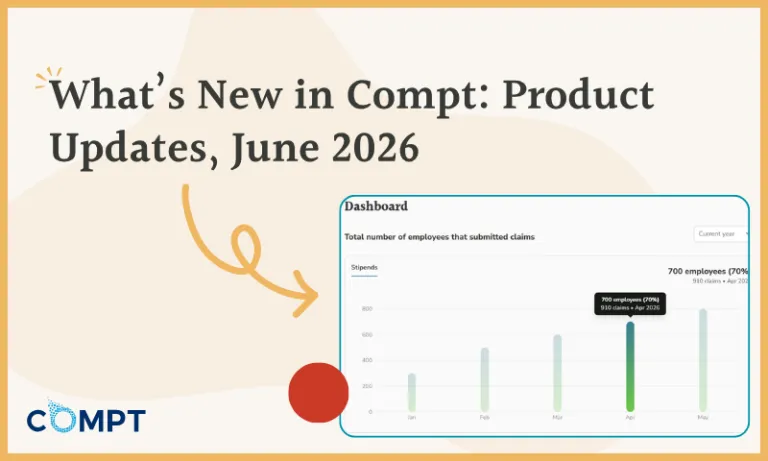
The next phase of modernizing and improving the Compt platform’s admin experience is focused on the dashboard. This enhancement introduces new visuals, filters, and tables so that you can easily get a snapshot of your benefits performance data in Compt.
The goal is to make it fast to answer the questions that come up most often: Who’s submitting? What are they spending on? How is utilization trending? Are we pacing toward full program spend?


We’re currently piloting the new dashboard with a subset of customers, with plans to release it to all customers over the next couple of months. If you’re interested in early access, you’ll retain access to the old dashboard as a backup during the transition — nothing gets taken away.
Interested in being an early adopter? Reach out to your CSM to join in, or request a Compt demo to get started.
Compt program admins now receive claim review reminders.
For reviewers who manage a queue of pending claims, it’s easy to lose track — especially when claims are shared across a team or spread across multiple programs.
Starting this month, reviewers receive a weekly email summarizing pending claims that need attention, broken out by program. The email distinguishes between claims explicitly assigned to them and unassigned claims that any team member with the right reviewer permissions can pick up. It’s simply a small nudge that keeps approvals moving and gets employees reimbursed faster.

Each program section shows:
- Assigned to you: the number of claims waiting on your specific action
- Unassigned: claims your team can pick up
This reminder is on by default, but can be turned off. Current Compt customers can click their name in the top-right corner of the Compt platform and navigate to My Account to manage their preferences.
Coming soon: AI-powered claim submission and review
We have a lot more in the works, including AI-powered features designed to make submitting and reviewing claims even easier for both employees and reviewers. We’ll share the full details in our next update.
“Compt brought structure: employees got clarity on what they could use, Finance got real-time visibility into spend, and HR got meaningful time back (often 10+ hours a month).”
— Turiya Gray, Senior Partner & Fractional Chief People Officer, FXG Partners
Compt is designed to get easier as your programs grow.
These updates are part of a broader effort to make Compt easier to run month over month. The goal is to give HR teams better visibility into how their programs are performing and strip away the kind of admin work that shouldn’t be taking up anyone’s time in the first place.
If your current setup makes it harder than it should be to see what’s working, request a demo to see what Compt looks like.
FAQs: Managing employee stipend benefits in Compt
This section addresses questions we hear from HR and Finance teams exploring Compt to manage stipends, reimbursements, and claim review workflows.
Compt’s redesigned dashboard puts participation, spend, and vendor data in one place. You can see how many employees are submitting claims each month, how stipend budgets are tracking over time, and which vendors are most popular across your workforce, all filterable by program and date range.
For HR teams, that makes it easier to demonstrate program engagement during reviews or leadership conversations. For Finance teams, the spend trend view supports budget pacing throughout the year. The goal is to make the most relevant data faster for you to find.
Request a Compt demo to see it in action.
What reporting metrics should HR track to prove that a lifestyle benefits program is actually working?
Finance cares about the metrics tied to the cost efficiency and adoption of your Lifestyle Spending Account (LSA) or employee stipend program. CFOs want to know whether spend is predictable, whether employees are actually using the benefit, and whether the program is reducing vendor costs. Abstract engagement scores tend to get dismissed as “fuzzy math.”
That means focusing on metrics such as participation rate (what percentage of eligible employees submitted at least one claim), utilization rate (how much of the allocated budget was spent), and category-level spend data (which LSA or stipend programs are getting traction and which aren’t). Those three together let you show that the benefit is reaching employees, that your budget isn’t sitting around unused, and that the categories you designed reflect what your workforce actually wants.
Compt’s redesigned dashboard surfaces all three directly. For a deeper look at how to structure a Finance-ready ROI case around these metrics, the Compt guide “How to Measure Employee Benefits ROI” is a good starting point.
What are claim review reminders in Compt, and who receives them?
Compt’s claim review reminders are weekly email summaries sent automatically to anyone with reviewer permissions in the platform. Each email breaks down pending claims by program (e.g., stipends, business expenses, professional development) and distinguishes between claims assigned to that reviewer specifically and unassigned claims their team can pick up.
There is no additional setup required. The reminder goes out automatically each week, and Compt reviewers can turn it off at any time in their account settings.
Can I control which programs appear in my Compt reviewer reminders?
The reminder reflects all programs in which you have reviewer access in Compt. If your organization runs multiple programs, each appears as a separate section in the weekly summary. To adjust reviewer assignments or permissions, contact your Compt administrator. To turn the reminder off entirely, navigate to My Account via the top-right menu in the platform.
Which platforms make receipt review, approvals, and ongoing administration easier for HR and Finance teams?
Compt is built to reduce both of the friction points that come up most often: claim review bottlenecks and reporting that requires manual work to be useful. The weekly reviewer reminder means claims don’t get buried; the redesigned dashboard means your data is easier to see and work with. Both changes reduce the recurring admin work of running a program month over month.
More broadly, Compt uses a reimbursement model rather than a card or marketplace model. Reimbursement-based Lifestyle Spending Account programs are easier to manage and run and are more convenient for employees; there are no card declines to troubleshoot and no merchant networks to manage, and you receive a clean payroll report that handles stipend tax classification for you.
Is it better to outsource Lifestyle Spending Account administration to a vendor platform or manage it internally?
For most companies, the internal cost of managing stipends manually is higher than it appears. The three most common DIY paths — spreadsheets, expense management tools, and adding money to paychecks — each carry hidden costs that compound over time.
Spreadsheets drive significant admin burden that grows with every new hire and every program change, with compliance risk baked in at every line. Expense tools weren’t built for benefits: they misclassify taxable vs. nontaxable spend, generate reporting gaps that make it hard to defend the budget to Finance, and can cost more in licensing than a dedicated platform. And adding stipends directly to paychecks — the “simplest” option — means paying employer payroll taxes on dollars that could have been nontaxable reimbursements, and spending 100% of the budget every cycle regardless of whether employees actually use the benefit.
A platform like Compt addresses all three. You only pay for funds employees actually use, tax treatment is handled correctly, and Finance gets clean visibility into participation and spend. For a detailed breakdown of what each in-house path actually costs, the Compt guide “Managing Employee Stipends In-House” is worth reading before making the call.
Editor’s note: Compt software supports the categorization and proper reporting of benefits according to IRS guidelines, helping businesses maintain compliance. However, Compt cannot provide tax advice, and users should consult their own tax, legal, and accounting advisors when necessary.

 No receipt chasing