
By default, unused LSA funds do not roll over. Rollover is possible, but it’s the exception rather than the norm; the majority of companies using Compt configure their LSA programs as “use it or lose it” within each cycle.
We get asked this all the time. Many rollover questions stem from prior experience with FSAs and prepaid benefit cards, but LSAs aren’t the same thing.
Compt’s Lifestyle Spending Accounts (LSAs) use a reimbursement model: employees submit a receipt and get paid back through payroll. So there’s no stored balance ticking down, only an upper limit that they draw from with each expense submission.
Today’s guide walks you through exactly how that works: what happens to unused funds at the end of a cycle, how funding cadence shapes those choices, and what it means for your budget, your Finance team, and your employees.
What happens to unused LSA funds at the end of each cycle?
At the end of the month, quarter, half-year, or year, benefits admins choose to either roll unused funds into the next cycle or let them expire with no return at all. The “right” answer depends on what you’re trying to do with your budget and what type of expenses it was meant to cover.
Here’s how each option works:
1. Rollover
Some companies set up their programs to carry unused funds forward into the next cycle, thereby increasing the next period’s spending limit. This is the least common of the available options.
The reason it’s less popular is pretty simple: expiry encourages participation, and if your goal is to help employees save toward a bigger purchase, choosing a longer funding cadence, like annual upfront, gets you there without needing rollover at all (more on this in a bit).
Because of that, it’s mainly reserved for companies that don’t want to commit to full upfront funding (e.g., for flight-risk reasons) but still want to give employees runway beyond a single cycle to cover a larger or more irregular expense.
And even where rollover is switched on, that’s only for carrying a balance into the next cycle. It’s exceedingly rare for companies to allow employees to stack multiple years of unused funds toward a massive purchase.
So:
- Can employees carry over unused LSA funds? If you want, yes.
- What happens to unused LSA funds at the end of the year? They almost always expire and return to the employer’s budget, even if rollover is the model you decide to go with.
2. No return (“use it or lose it”)
With this model, funds simply expire and nothing carries forward or returns early. This is the default most Compt customers land on, and it’s the closest analog to how people already think about certain types of benefits.
For example, if you offer monthly commuter benefits for parking and transit expenses, those are nontaxable up to a certain limit that resets every month. Rolling those funds over wouldn’t make any sense.
IMPORTANT: The employer owns the money the entire time, whether it rolls forward or expires. It never sat in the employee’s account to begin with, so unused funds aren’t being taken away from anyone. The budget just goes back to doing whatever it was going to do next.
Mid-cycle funding corrections
Outside the normal cycle, admins can also adjust an employee’s allocation right away rather than waiting for the next reset (e.g., if an employee moves into a role with a higher stipend partway through the year). The new amount applies going forward without disrupting the rest of the program’s setup.
LSA funding cadence, accrual, and proration options
The other half of the equation is how you’ll structure your LSA program. This involves two separate decisions: funding cadence and accrual.
- Cadence is how often the funding window resets. In Compt, you can fund an LSA on a monthly, quarterly, semiannual, annual, or biennial cycle.
- Accrual is how employees get access to the money within that window — the full amount upfront (prorated for new hires or not), or built up gradually in smaller increments, which can be monthly, quarterly, or semiannual depending on the cadence.
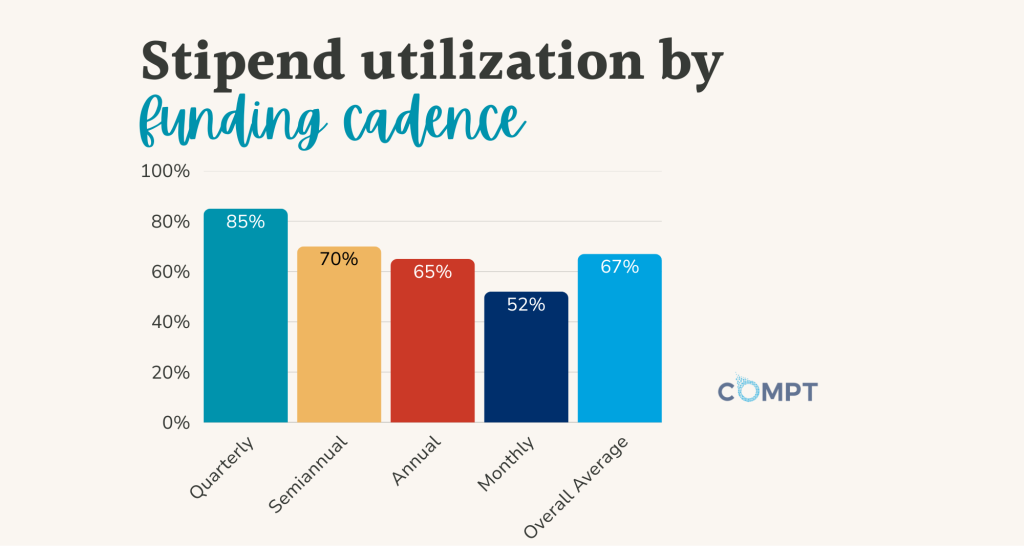
This is an important consideration, because cadence directly affects LSA participation and utilization. According to our 2026 benchmarking data, quarterly-funded programs reached 85% utilization, compared to 70% for semiannual, 65% for annual, and just 52% for monthly.
Monthly
Monthly only has one accrual setting: monthly. There’s no upfront option here because the cycle itself is already as short as it gets — funds are released, and whatever’s unused resets at the end of the month.
Monthly stipends have the lowest utilization in our data (52%), for two reasons. The funding resets so frequently that it’s easy to lose track before the month’s out. And monthly is also the default cadence for categories like commuter, coworking, and cell and internet — stipends that are often sized to cover the full cost of a service rather than what any one employee actually spends. If your $100/month cell phone stipend covers a $60 bill, that gap alone pulls utilization down, even with nothing going to waste through neglect.
Quarterly
You can fund a quarterly LSA upfront, upfront with proration, or built gradually via monthly accrual within the quarter. The upfront version gives employees the full quarter’s amount on day one; the monthly-accrual version has it build up over the three months, so someone who doesn’t spend in month one still has the full balance available by month three.
Either way, unused funds expire at quarter-end unless the program is configured otherwise. Quarterly is the highest-performing cadence in our data, at 85% utilization.
Semiannual
Semiannual adds another accrual option on top of quarterly’s. You’re able to fund the LSA upfront or upfront with proration, or with monthly or quarterly accrual. That last one means funds can build in increments across the six-month window.
Utilization among semiannual benefits cycles comes in at 70%, which is the second-best-performing cadence and a decent middle ground for categories that don’t fit neatly into either a tight monthly reset or a full annual commitment.
Annual
Annual LSA funding has the widest range of options: upfront or upfront with proration, or monthly, quarterly, or semiannual accrual. That flexibility makes it a common choice for programs that want annual-scale budgeting without locking into a single accrual pattern.
Utilization is 65% for annual stipends, which is lower than quarterly or semiannual. The main reason for this is that a full year gives employees plenty of room to put off spending until it’s too late to use the benefit at all.
Biennial
Biennial LSAs can be funded upfront, upfront with proration, or accrued monthly across the two-year window. It’s the least common cadence and mostly reserved for large, infrequent purchases like sabbaticals or major equipment refreshes, where a shorter window wouldn’t give employees enough time to actually use the full amount.
We don’t have utilization data specific to biennial cadences in this year’s benchmarks because it’s a small enough slice of programs that it doesn’t show up as its own line in the report.
Upfront funding with proration
Someone joining in October doesn’t have to get a full year’s stipend for three months of employment. You can set up your LSA program so that new hires receive a proportional amount based on their hire date instead of the full annual sum.
This is the most common way companies structure stipends and LSAs with quarterly, semiannual, annual, and biennial funding cycles because prorating is a lot less complicated from a back-office perspective than creating a separate benefits cycle for every new person who joins the company.
Is it better to fund the LSA monthly, quarterly, or annually?
From both an admin and a utilization standpoint, quarterly funding is the best for Lifestyle Spending Accounts. And our customers know this; 78% of Compt LSAs are funded quarterly.
Why?
Monthly cadences create more admin burden regardless of whether funds accrue toward year-end or reset every 30 days. Even though Compt automates reminders, it’s easy for employees to forget a deadline on such a short time frame, whether that’s the year-end expiration on a monthly-accrual stipend or a hard reset on a use-it-or-lose-it one. Because of that, more of your employees will either submit late or ask for extensions.
Monthly underperforms on utilization because the pressure is real but too small for employees to notice. A reset every 30 days means the deadline is always close, but the lower dollar amount makes it easy to mentally deprioritize.
Annual underperforms because the deadline is too far away to create urgency. With a full year, there’s no reason to act in month one, month three, or month eight. By the time the deadline nears, many forget the LSA exists or miss the window to use it for something practical.
Quarterly is the “sweet spot” that solves both problems. Four nudges a year is enough to keep the benefit top of mind, and a three-month window is long enough that employees actually have time to plan around it. They can book that dentist appointment, research the home-office purchase, etc.
“Quarterly ends up being the sweet spot. … It’s manageable, and it keeps the benefit top of mind so employees remember their company is supporting them, without becoming an annoyance.”
— Mary Migiano, Head of Customer Success at Compt, in our 2026 Annual Benchmark Report podcast episode
Curious how employers are structuring their LSA and stipend cadences at midyear? Register today to receive our 2026 Midyear Lifestyle Benefits Benchmark Report, launching in September 2026.
What happens when an expense gets rejected?
Rejection is always a manual review decision, never automatic. Once HR rejects a claim, the funds can go back to the employee immediately, get held until the next cycle, or not return at all, which is useful for categories like a commuter benefit that’s only valid for a specific month.
In most cases, the default is immediate return: rejected funds go straight back to the employee’s balance so they can put them toward something else. The exception to this is when someone’s expense gets rejected right before the cycle is about to end.
Say HR rejects a claim on the last day of the cycle and the funds instantly return to the employee’s balance. An instant return technically gives the employee a few hours to find a new eligible expense, make the purchase, and submit a fresh receipt before the cycle closes. That’s not a real window to work with. So for rejections that land on the last day of a cycle, Compt pushes the funds into the next cycle instead of returning them immediately.
How does Compt determine which tax year an expense counts toward?
Compt determines which tax year an expense counts toward based on when the employee submits the expense in the platform, not when the reimbursement actually gets paid out through payroll. If an employee submits a receipt on December 31, it counts toward that tax year even if you don’t run payroll until January.
This matters most for annual caps, like the $5,250 tax-free limit on professional development stipends. If you make a funding correction or add an exception in the new year, the IRS treats those funds as given in the new year, even if they’re meant to cover an expense from months earlier. So if you want a clean cutoff, it’s better to close out approvals before year-end rather than count on fixing it retroactively in January.
Unused funds are a budget-control mechanism
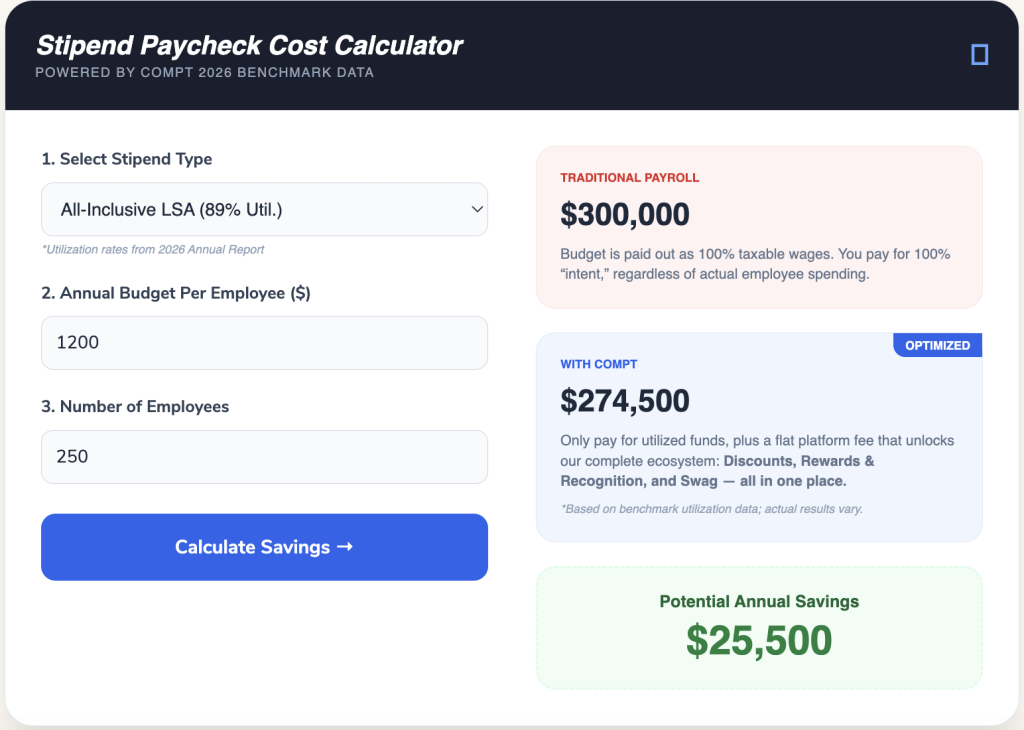
In a prepaid card model, unspent balances are money that already left the company. You’ve funded 100% of the card upfront whether or not employees used it, and whatever sat unused at cycle-end is gone.
Even if you use a stipend instead of a prepaid card, giving out the stipend through payroll will create the same issue. Every dollar is paid out upfront, so you’re paying for 100% utilization no matter what.
Stop overpaying for underused benefits.
Traditional payroll stipends are paid out 100% regardless of actual use.
With Compt, you only pay for the funds employees spend, saving you thousands while increasing benefits engagement.
With Compt’s reimbursement model, 100% is the max but almost never gets hit because nothing leaves your budget until an employee actually submits a receipt for an eligible expense. Utilization determines how close you get to your budget’s upper limit.
Among Compt users, all-inclusive LSAs averaged 89% utilization in 2025. From a finance perspective, that means the average company is spending 89% of their total LSA budget.
(This is why reimbursement-based LSAs beat out prepaid cards every day of the week.)
How LSAs handle new hires and departing employees
Timing at the edges of employment works the same way as everything else in this article: it’s configurable, not fixed.
The company determines exactly when new hires start receiving funds — options include immediately upon hire, a set number of days after hire, the first of the following month, or the start of the next cycle. For quarterly, semiannual, annual, and biennial funding, you can also prorate the initial amount so their LSA automatically scales to the number of months of that cycle they’re on payroll.
Employees on leave can have their stipend paused and reactivated when they return.
Terminated employees are removed from eligible groups automatically on the next HRIS sync (if you have it set up), or manually removed with one click on the Team list, which also cuts off their ability to submit new claims. Whatever’s left in their allocation simply isn’t spent and returns to your lifestyle benefits budget; there’s no separate step to claw funds back, because the budget was never disbursed to begin with.
Set expectations before the deadline hits, not after
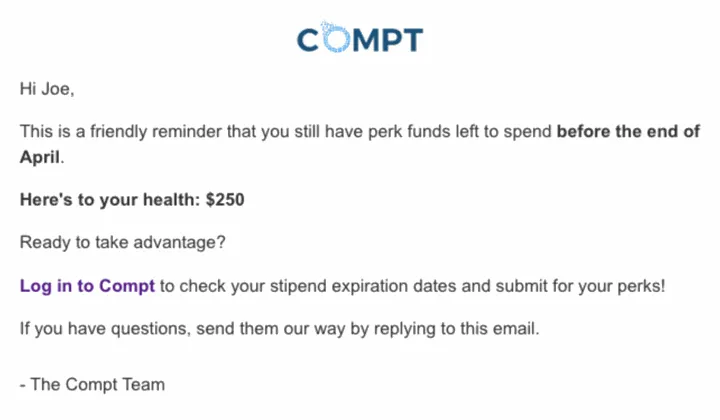
We find that most rollover and expiration confusion isn’t a platform problem as much as it is a communication gap. Employees aren’t checking their LSA balance every day, so a use-it-or-lose-it deadline that’s obvious to HR can still catch them completely off guard.
Short reminders leading up to their LSA balance expiry date go a long way, and Compt already does that part for you automatically. It handles the timing, cadence, and delivery based on when the funds expire, so your job as HR is really just customizing the message.
The same goes for rollover-enabled programs. If funds are about to carry forward, say so to prevent your team from scrambling to spend down a balance that didn’t need spending down in the first place.
Why HR and Finance teams run their LSAs on Compt
Compt is the best LSA/stipend management tool for monthly, quarterly, semiannual, and annual benefit cadences with carryover rules because it has no prefunding requirement.
Card-based platforms have to load the balance before an employee can spend it, and the money’s already out of your account regardless of whether it ever gets used. Cadence and rollover settings on those platforms mostly just describe how a card refills, not what happens to your budget.
Compt gives you more control and auditability because no money moves until an employee spends and submits a receipt.
And because every expense category can run its own custom rules, your monthly commuter benefit and your annual equipment budget don’t have to share a policy just because they live under the same lifestyle benefits budget.
Want to see how it works? Request a personalized Compt demo.
FAQs: LSA rollover and expiration policy
Compt supports rollover as a configurable option, but it’s the exception rather than the norm; most Compt programs are set up as use-it-or-lose-it within each cycle. When rollover is enabled, it typically carries a balance into the next single cycle, not across multiple years. Stacking several years of unused funds toward one big purchase isn’t a standard setup.
What happens to unused LSA funds at the end of the year — rollover or use-it-or-lose-it?
Compt gives admins two options at the end of any cycle: let funds expire (the default for most programs) or roll them into the next cycle. By default, unused funds simply expire and return to the employer’s budget, because they never functioned as an employee-owned balance to begin with.
Is it better to fund an LSA monthly, quarterly, or annually?
Compt customer data shows quarterly funding is the most reliable choice for LSAs — it reached 85% utilization in 2025, compared to 65% for annual and 52% for monthly. Quarterly works because it’s frequent enough to stay top of mind, but gives employees enough runway to plan a real purchase around it.
Is it better to give a $500 yearly pool or $50 per month?
Compt’s data shows quarterly funding outperforms both monthly and annual on overall utilization, but for a straight $500/year vs. $50/month comparison, neither wins outright. It depends on what the benefit is for: $50/month suits a recurring cost like a cell and internet stipend, while a $500 annual pool suits a bigger, one-time purchase like home-office equipment.
For LSAs specifically, though, quarterly remains the best default, because it’s flexible enough to cover both patterns without forcing a tradeoff.
Which stipend management tools are best for monthly, quarterly, and annual benefit cadences with carryover rules?
Compt is built specifically to handle monthly, quarterly, and annual stipend and LSA cadences with configurable carryover rules, because it’s reimbursement-based rather than card-based and there’s no prefunding requirement locking you into one structure. Each category (commuter, wellness, professional development, etc.) can run its own cadence and carryover rules under the same program, which card-based platforms typically can’t do without separate accounts.
We front-load our LSA annually — which platforms handle clawback on termination?
Compt handles this primarily through upfront funding with proration, which limits how much budget is at risk if someone leaves early, plus an immediate-return option that cuts off access to any unused balance as soon as a termination syncs from your HRIS. For one-off exceptions, admins can also use a spot bonus or funding correction instead of changing the whole program’s setup. There is no need to “claw back” any funds from Compt programs because the platform is reimbursement-first, meaning the money does not leave your account until the employee submits an expense that you approve.
Editor’s note: Compt software supports the categorization and proper reporting of benefits according to IRS guidelines, helping businesses maintain compliance. However, Compt cannot provide tax advice, and users should consult their own tax, legal, and accounting advisors when necessary.

 No receipt chasing